TikTok Instant Forms
Subscribe a TikTok advertiser's lead forms and match their fields to yours.
A TikTok Instant Form is a lead form that opens inside the TikTok app when someone taps your ad. EventsIQ reads each lead from TikTok as it arrives, translates its answers into your fields, and routes it like any other lead.
Leads usually reach EventsIQ within seconds. If TikTok's notice about a lead is missed, EventsIQ still picks the lead up within about ten minutes, and a lead is never stored or sold twice.
What you'll need
- A TikTok For Business login with access to the advertiser account that runs the form.
- The Instant Form already created in TikTok Ads Manager.
- A routing to send the leads to, or you can attach one later.
Step 1: Start a new form
Go to Forms, click New form, give it a name and pick TikTok instant form. On Where leads go, pick a routing and click Continue, or click Decide later.
Step 2: Connect TikTok and pick the form
- If no TikTok account is connected yet, click Connect TikTok. TikTok's sign in opens in a new tab, so the wizard keeps your place. Approve everything it asks for, come back, and click Refresh accounts. To use a different login, click Connect another account.
- Pick the TikTok login, then the Advertiser account. Each is picked for you when there is only one. Type in any box to search.
- Pick the Instant form. Forms already connected to EventsIQ are greyed out and marked already connected.
- Click Connect instant form. The form keeps the name you gave it on the first step, or
TikTok -and the form's name if you left it empty.
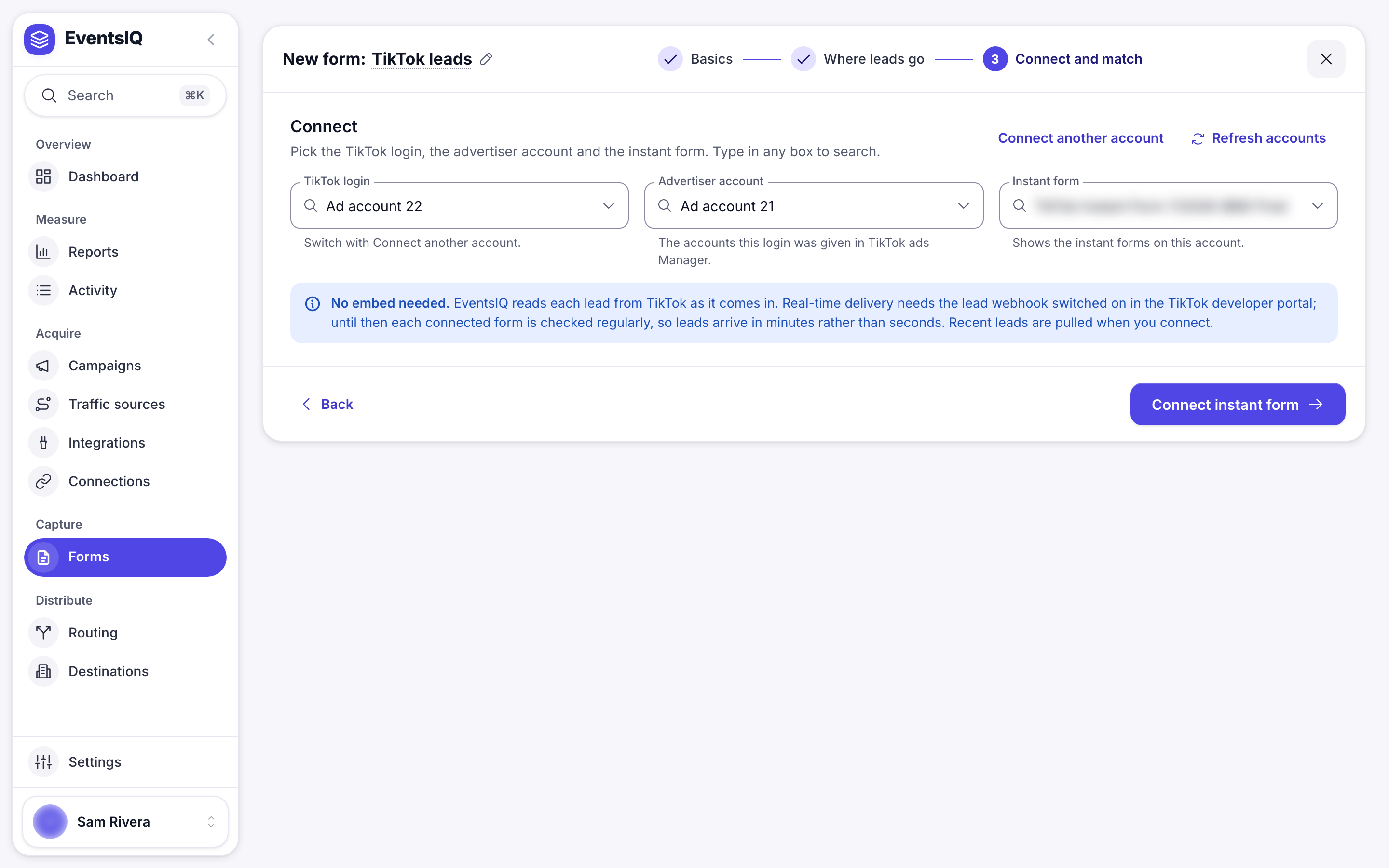
EventsIQ pulls up to three recent leads from the form, so the next step can show you real answers. A brand new form with no leads yet connects anyway, and the field map is filled in from the first real lead instead.
TikTok checks two permissions before it lists lead forms: the app's permission to read leads, and your login's role on that advertiser account. EventsIQ shows TikTok's own error word for word. The usual fix is to reconnect and approve everything, or to ask the advertiser account's admin to give your login a role with access to leads.
Step 3: Match up the fields
Check that each answer lands in the right EventsIQ field: phone in phone, email in email. Click Do it for me to match everything EventsIQ recognises, then fix the rest by hand. See Fields.
Step 4: Turn on lead delivery
TikTok only sends new leads straight away for advertiser accounts that have lead delivery turned on. After you connect your first form on a login:
- Go to Acquire → Connections.
- Open the menu (⋮) on the TikTok row and pick Turn on lead delivery. It says how many advertisers with forms it covers.
- A message confirms it. If an advertiser is still not covered, the row shows Needs you and how many advertisers leads arrive from, for example 1 of 2.
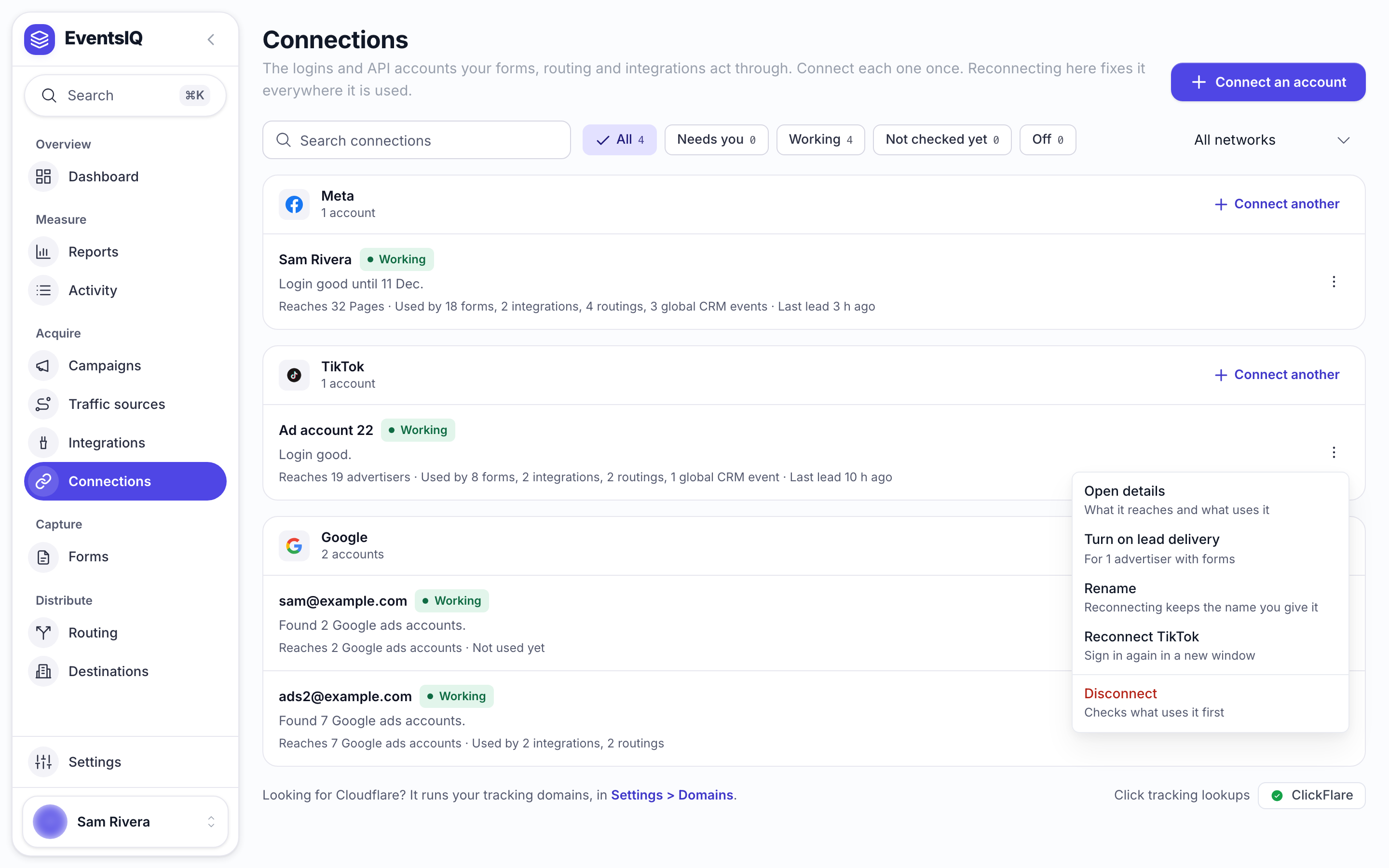
It is safe to pick again at any time. It turns delivery on for any advertiser that is missing and changes nothing that is already right.
After you reconnect a TikTok login, TikTok stops sending new leads straight away, without any error. Pick Turn on lead delivery again. Until you do, leads still arrive, just up to ten minutes late.
Test leads
TikTok does not mark test leads, so EventsIQ cannot tell them apart from real ones. A test lead that arrives with its answers is stored and routed. If you are testing with a live routing, use details your destinations will recognise as a test, or attach the form to a routing that is not live yet.
What EventsIQ keeps from each lead
Besides the answers, every TikTok lead carries its advertiser id, form id, ad id and campaign ids. A EventsIQ campaign on this form claims that TikTok campaign's spend, so Reports show cost and revenue together.
Keeping it working
- If lead volume drops suddenly, check Connections first. A TikTok login that expired shows there, and you are also alerted.
- After any reconnect, pick Turn on lead delivery again.
Related
- Connections: the TikTok login this depends on.
- Fields: mapping TikTok's answers.
- Routing: what happens to a lead once it is in.