Routing
The routing library: branches, destination waterfalls, events, and attaching forms.
A routing setup decides what happens to a lead after it arrives. It holds your rules, the destinations those rules point at, and any conversion or CRM events that should fire afterwards.
It is not owned by a form. It is a library object, and many forms can point at the same one. Set it up once, attach every campaign to it, and change the destination order in a single place when a destination's payout changes.
A routing setup is assembled from parts covered on the other three pages. If you have not set up a destination yet, do that first: routing with nothing to point at cannot do anything.
The library
Routing lists everything you have, with each setup's status and last lead, who it sends to, and how many forms are attached to it. The Presets tab beside Routing setups is the preset library.
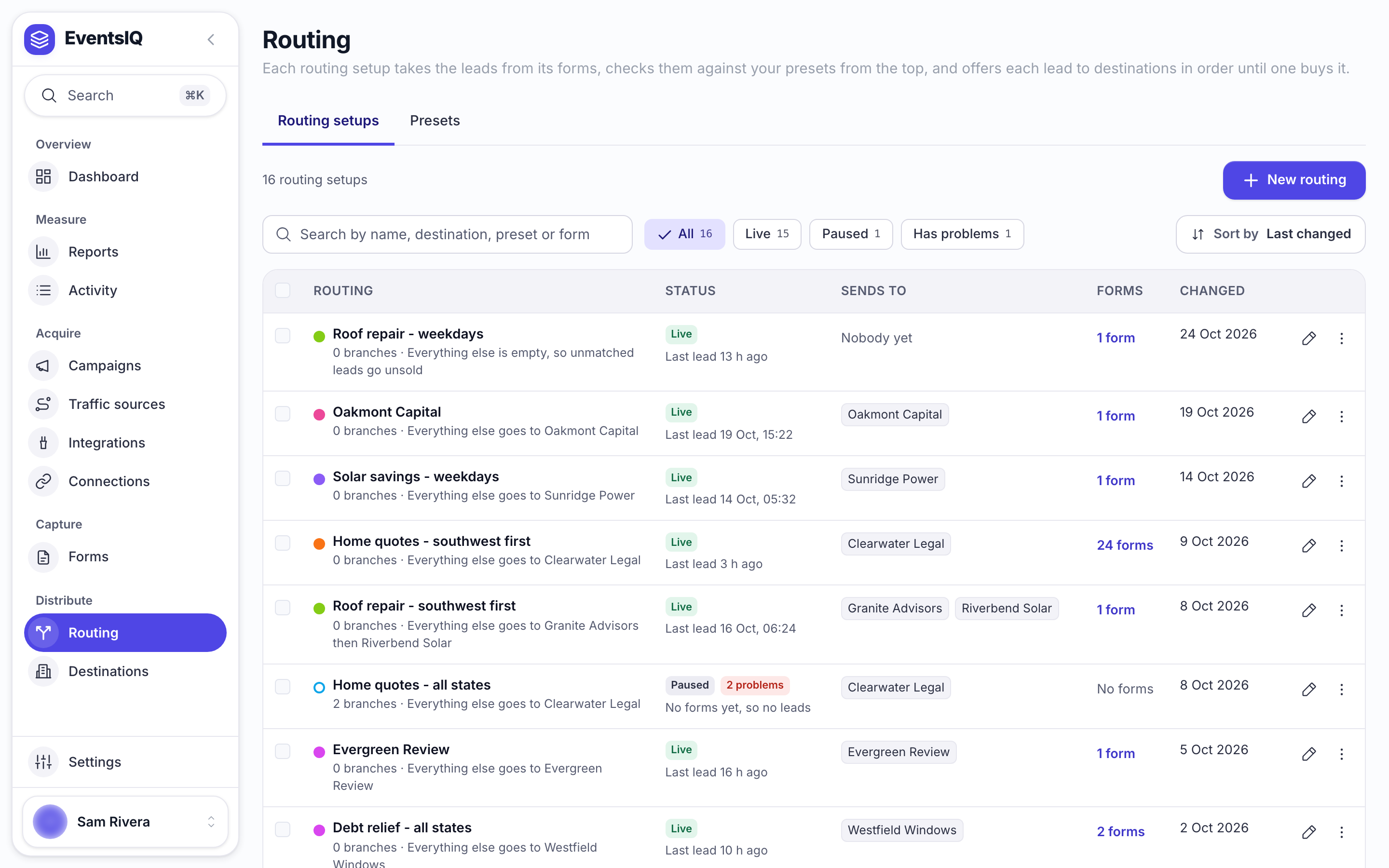
Each setup is Live or Paused: use Pause or Go live in its menu, or at the top of the setup itself. A paused routing setup still receives leads (they are captured, normalised and stored), but nothing is routed and nothing is sold. It is the right control for taking routing offline without dismantling it. Pausing asks first.
A routing setup cannot be deleted while a form still points at it. Detach the forms first; the error names them so you know where to look.
The routing setup
Open a routing setup and you see it two ways, switched with List and Map at the top. Changes save automatically.
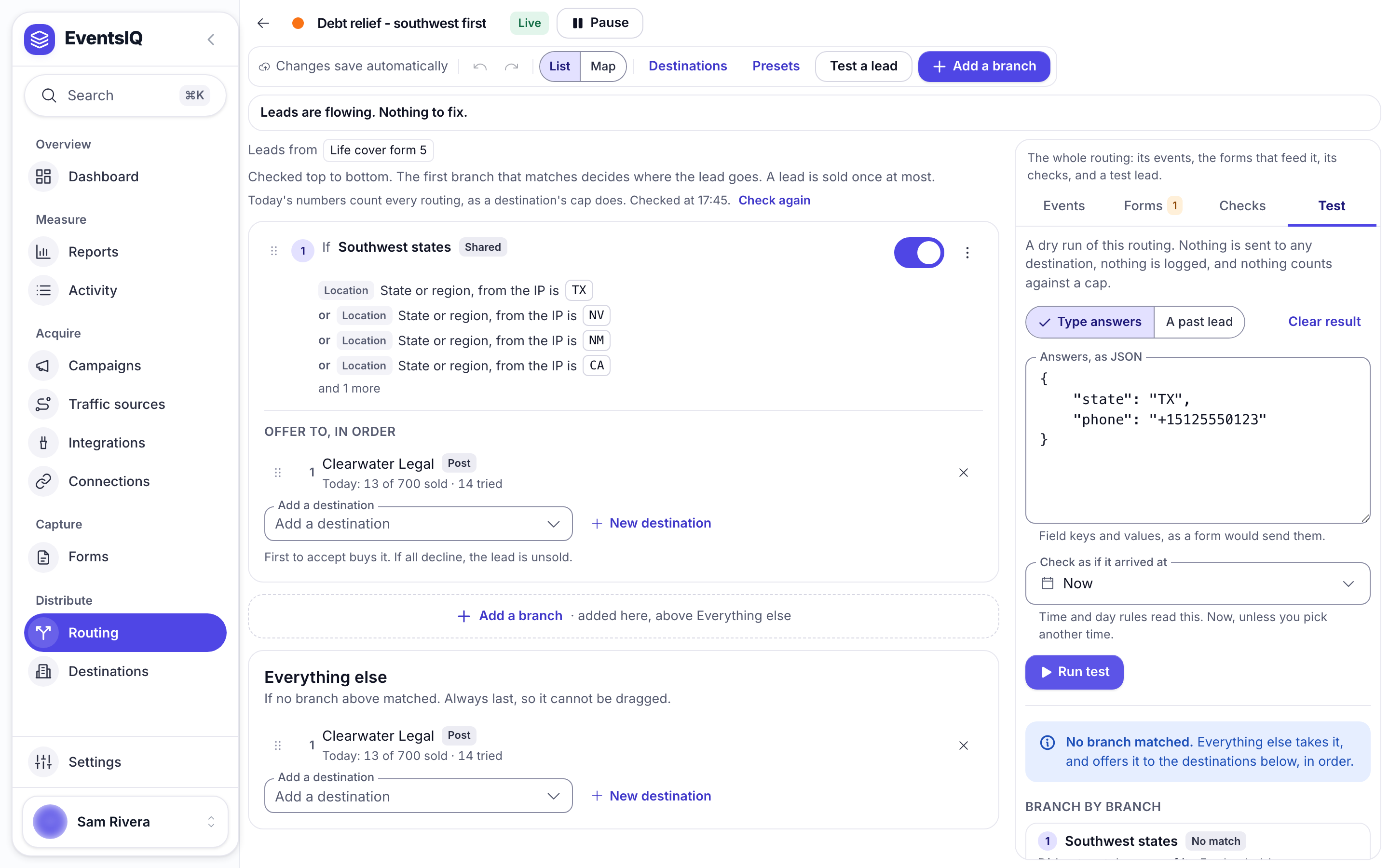
List reads top to bottom. A line at the top says whether leads are flowing and what to fix, then Leads from names the forms that feed it. Below that is one card per branch, numbered in the order it is tried, each showing its preset's rules in words and, under Offer to, in order, its waterfall: the destinations it offers the lead to, with today's sales against each one's cap.
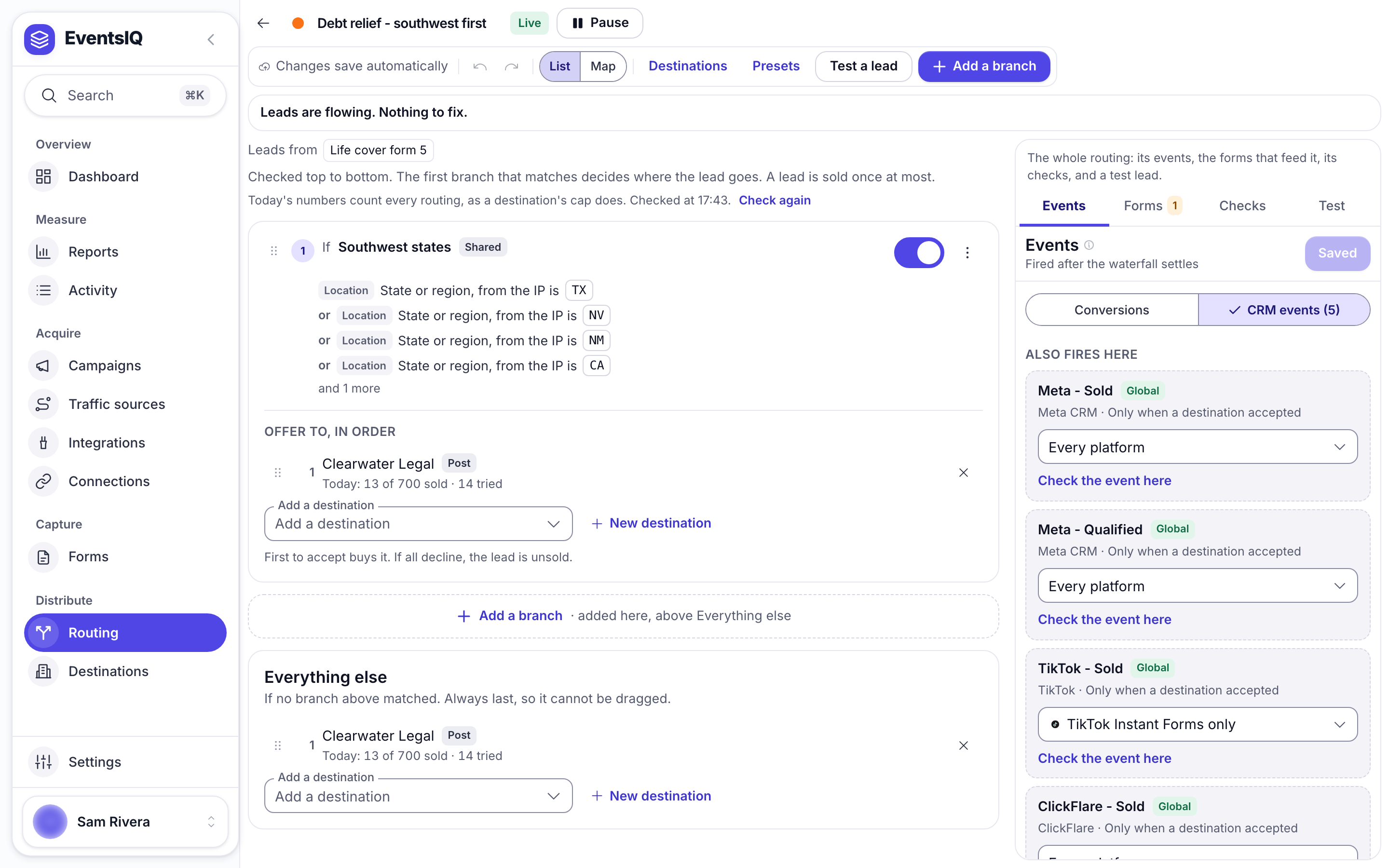
Last is Everything else, the default branch. It catches every lead no branch above matched, and it is always last, so it cannot be dragged.
Map draws the same thing as a picture: the setup, then its branches left to right, each leading to its destinations.
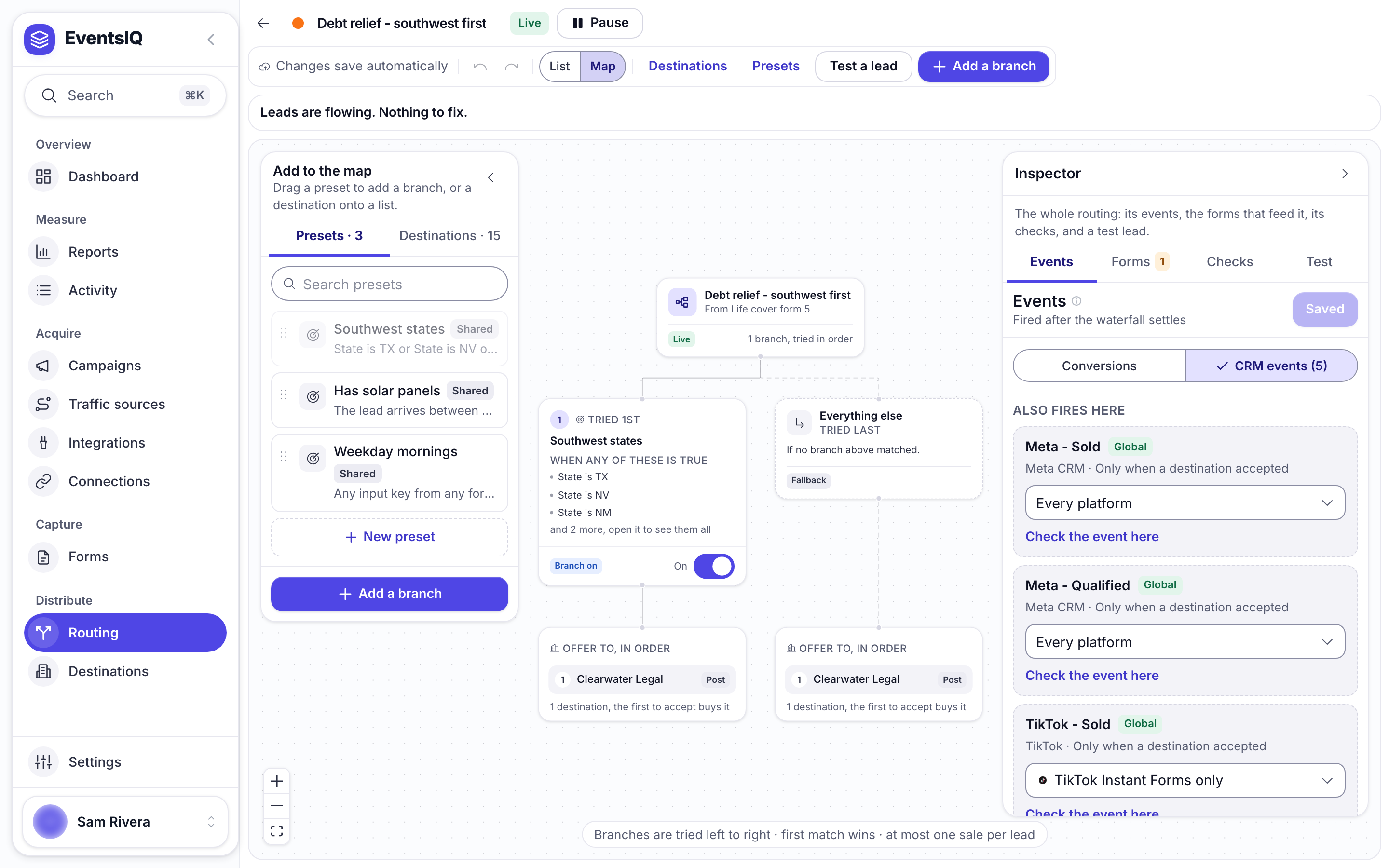
You cannot draw connections by hand on the map. It is a picture of your routing, not a place to invent new shapes: the layout comes from the configuration, so a branch always looks like a branch.
The panel on the right has four tabs: Events, Forms, Checks and Test, covered below.
Branches
A branch is one preset paired with an ordered list of destinations. That is the whole idea.
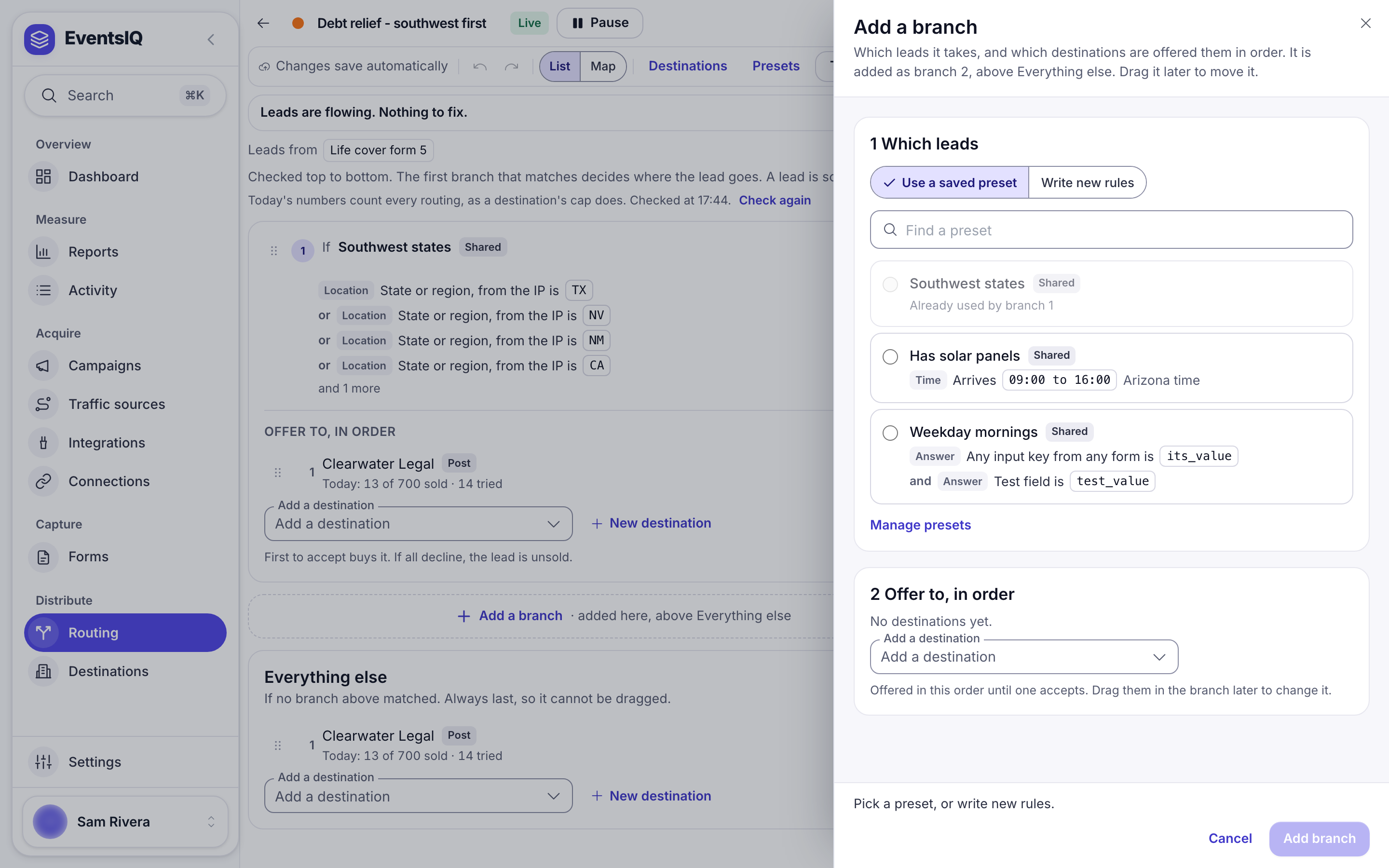
Click Add a branch. Under Which leads, either Use a saved preset or Write new rules right there. Rules written this way are a preset that belongs to just this routing setup (Only this routing); you can share it later if you want to reuse it. Then add the destinations, in the order they should be offered, and click Add branch.
Order is priority
Branches are tried top to bottom, and the first match wins. In the List view, drag a branch up to give it precedence. Nothing below a matching branch is ever considered. On the Map, the same order runs left to right.
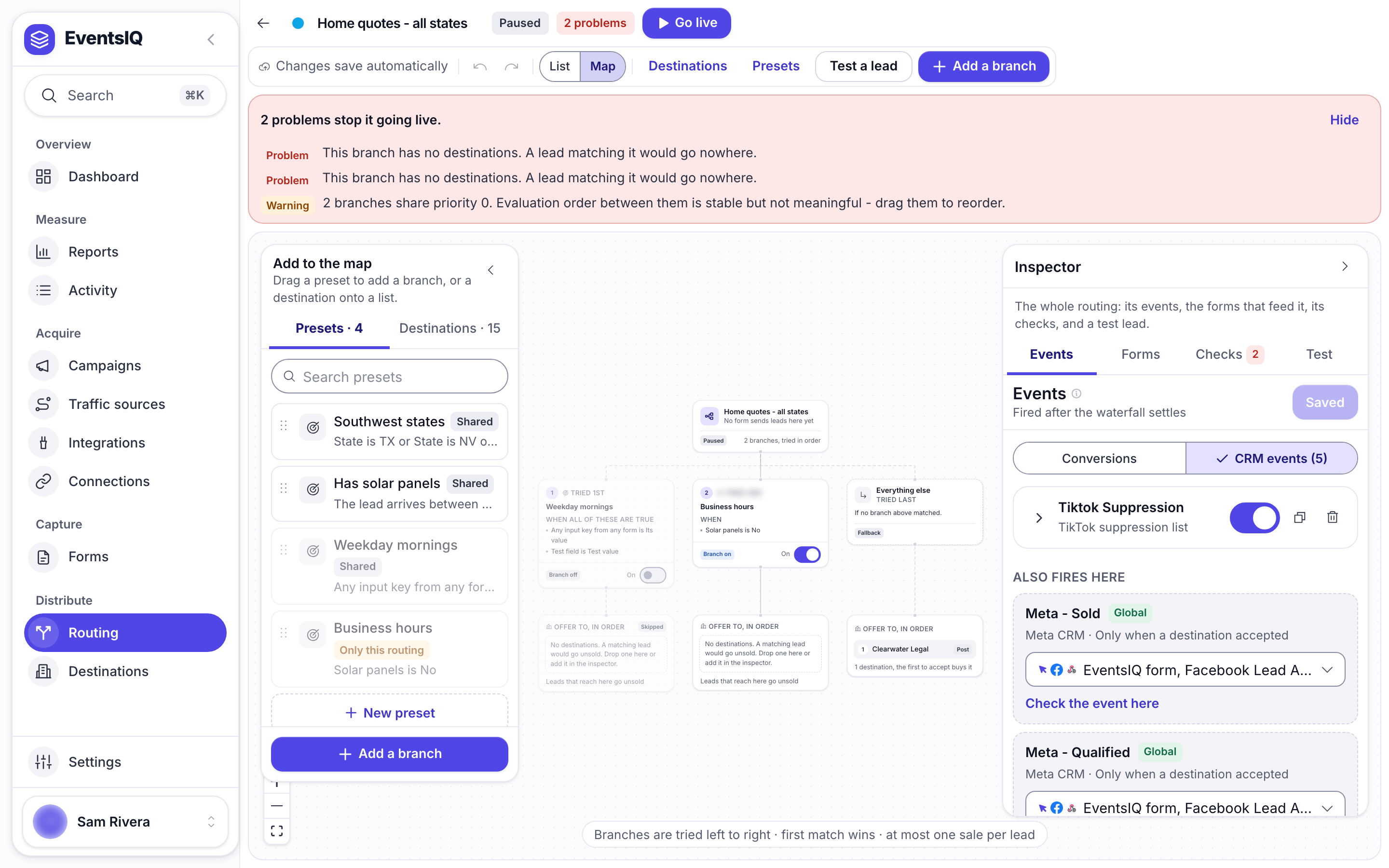
The number on each branch is the live answer to "which of these gets asked first": it is not a field you set, it is where the branch sits. Each branch also has a Branch on switch, so you can take one out without deleting it.
Order inside a waterfall
Within a branch, drag the destinations under Offer to, in order to change who gets first refusal. The lead is offered to each in turn, and the first whose reply counts as a sale wins it: everything below is never called. Add a destination appends one to the end.
The default waterfall runs when no preset matched. It does not catch leads from a matched branch whose destinations all declined. If you want a matched branch to fall through to your general destinations, add those destinations to the end of that branch's own list.
Attaching forms
The Forms tab in the right-hand panel lists every form feeding this routing setup.
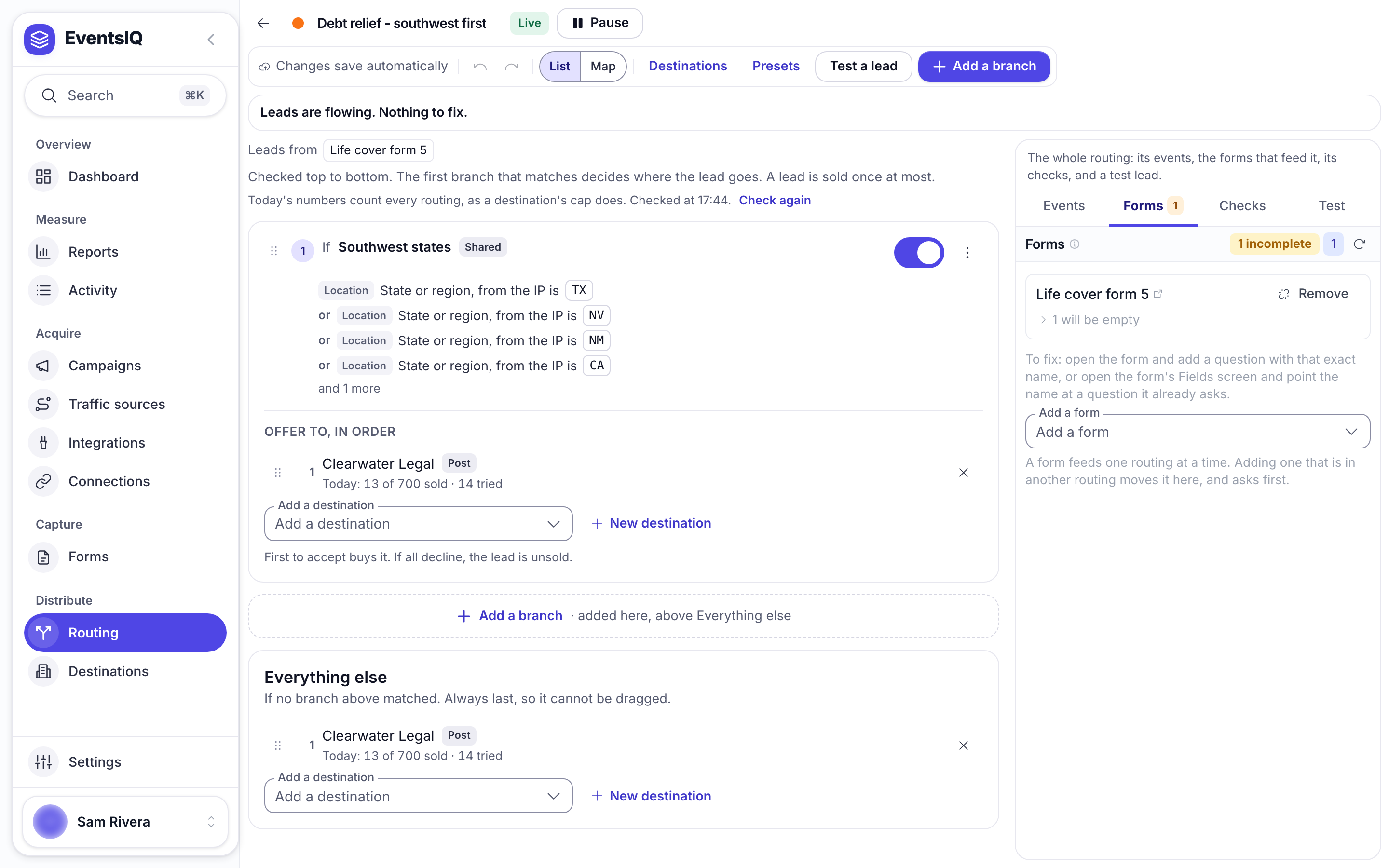
This is also where EventsIQ checks the field contract. A routing setup knows which canonical fields it needs: every key referenced by its presets, its destinations' body templates, its ping templates and its event payloads. Each attached source is compared against that list, and anything missing is flagged per row.
Take those warnings seriously. A preset testing a field that never arrives does not error: it simply never matches, which quietly sends every lead to your default waterfall.
Attaching happens from the form's side too: pick a routing setup in the create wizard, or change it later from the form's settings page.
Events
The Events tab configures what fires after the waterfall settles. Unlike the rest of the canvas, it is a draft with a Save events button, and it applies to the whole routing setup rather than to one branch.
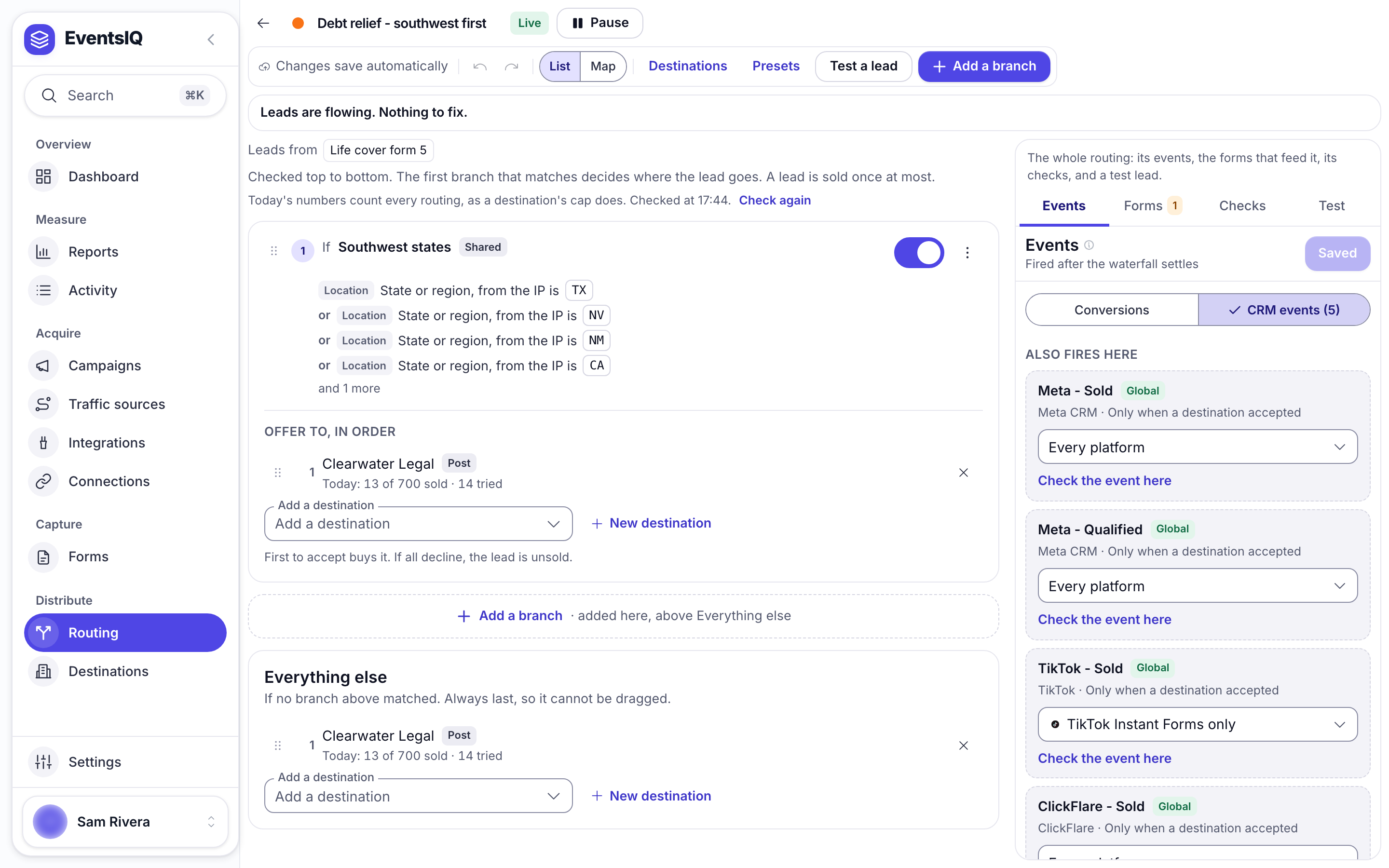
It has two tabs.
Conversions is read only. It lists the campaigns whose form routes here, and the conversion integration each one picked. Those report sales your CRM sends back later as postbacks, so they are set up on the campaign, not here.
CRM events fire as soon as the waterfall finishes. Click Add a CRM event to add one. Each lane has:
- Global event: Configure inline to set it up here, or pick a global event shared with other routings.
- Only for: Any destination, or one destination in this routing.
- Fires: Only when a destination accepted, Only when every destination declined, Only when the visitor tapped to call or Every lead, whatever happened.
- Only from: limit it to leads from certain places, for example only Google Ads lead form. Nothing ticked means every platform.
- Provider: where it goes. Meta, TikTok, Snapchat, Google, Microsoft Ads and NewsBreak postbacks, Meta, TikTok, Snapchat, Google, Microsoft Ads and NewsBreak suppression lists, ClickFlare, or a plain Webhook.
A webhook body can reference {{system.stage}}, {{system.price}} and, usefully,
{{response.anything}}, which reaches into the reply the accepting destination gave you.
Personal details sent to Meta, TikTok, Snapchat, Google, Microsoft Ads and NewsBreak are SHA-256 hashed before they leave, as each network requires. You do not have to do anything to make that happen.
See Global events for every provider's fields, including the Google postback and suppression lists.
Checking and testing before you go live
Two more tabs in the right-hand panel earn their place.
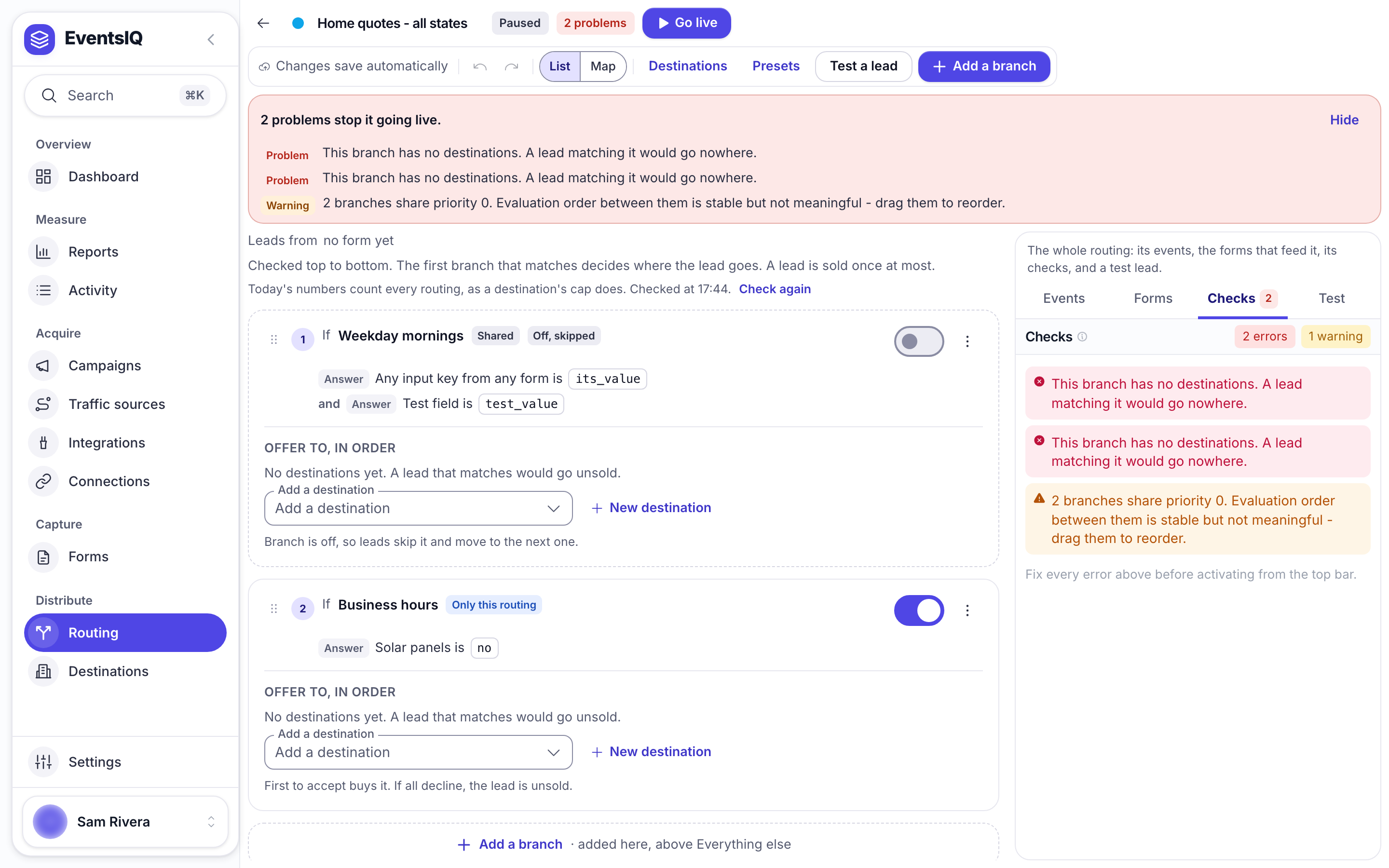
Checks lists everything wrong with the routing setup as configured: a branch pointing at a deleted preset, a branch with no destinations in it, a destination that no longer exists. The same problems show in the line at the top of the setup.
Test runs a sample lead through the routing without sending anything, so you can see which branch it would match before a real lead finds out for you. Type answers as JSON, or pick A past lead, then click Run test. Test a lead at the top opens the same thing.
When both look right, click Go live.
Overriding a destination for one routing setup
Destinations are shared, so editing one in the directory changes it everywhere. When a single routing setup needs to send something different (an extra field, a different campaign ID), click that destination in its branch and override only what differs.
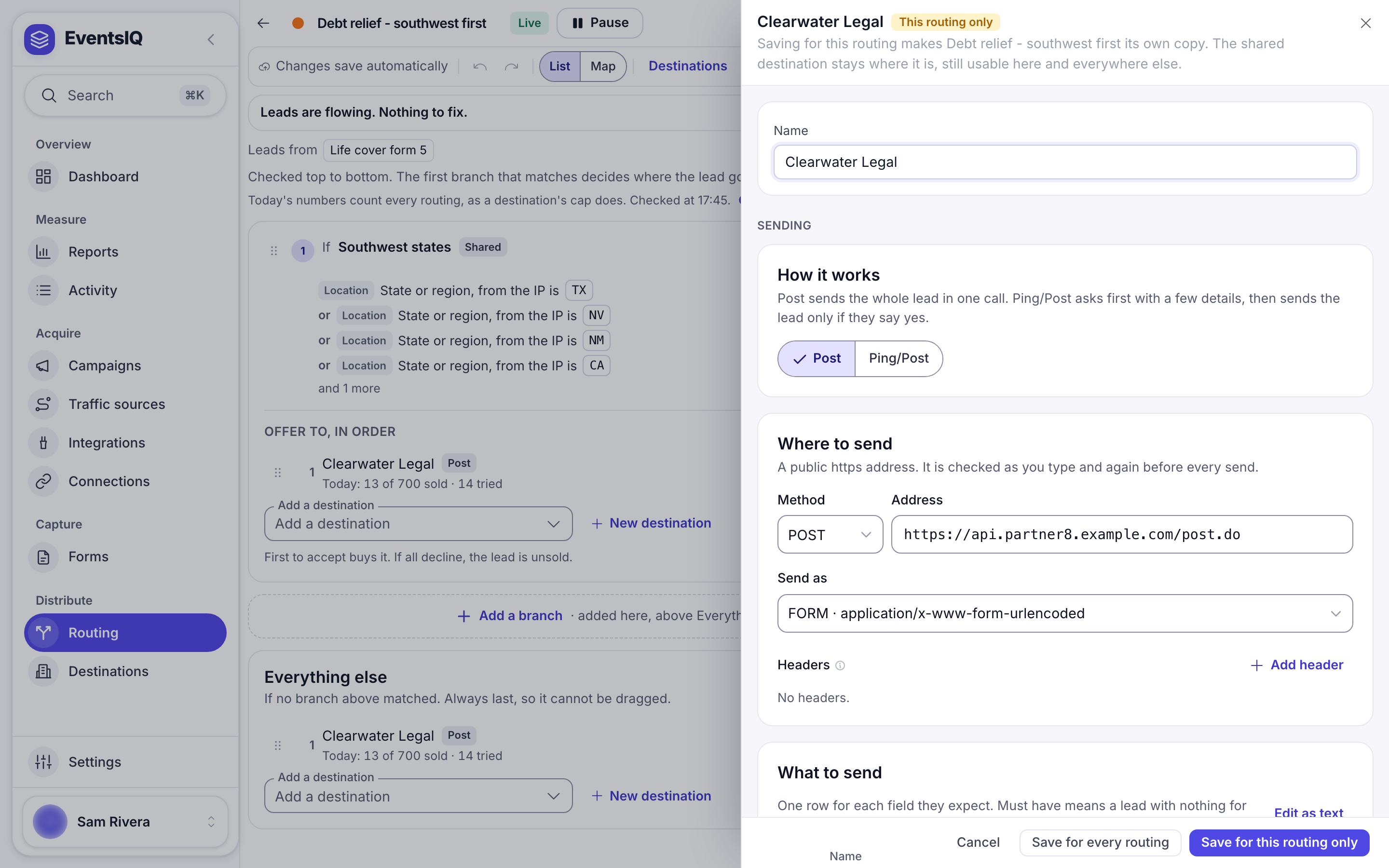
Everything you do not override keeps following the directory entry, so a destination that changes its endpoint is still a one-line fix. The destination's name, whether it is taking leads, and Post or Ping/Post always come from the directory and cannot be overridden here.
What to read next
- Fields: the vocabulary presets and destination templates are written in.
- Presets: the rules a branch is built on.
- Destinations: what a waterfall is made of, and what counts as an acceptance.