Global Events
CRM updates, Google postbacks and suppression lists that fire across many routings at once.
An event is something EventsIQ does after a lead's waterfall finishes: tell Meta the lead became a customer, report the sale to a Google conversion action, add the person to a suppression list, or post the outcome to your own system. A global event is one you set up once and use across many routings, so changing it in one place changes it everywhere.
You'll find them under Settings → Delivery and tracking → Events. The same section has Form scripts, the tags and snippets your website forms load.
Every routing has an Events tab with CRM events. You can configure an event right there, just for that routing. Make it a global event instead when several routings should do the same thing, for example every solar routing adding people who bought to the same suppression list.
Conversions and CRM events
A routing's Events tab has two tabs:
- Conversions is read only. It lists the campaigns whose form routes here and the conversion integration each one picked. Those fire when your CRM sends a postback, and are set up on the campaign, not here.
- CRM events fire when the waterfall finishes. This is what this page is about.
The list
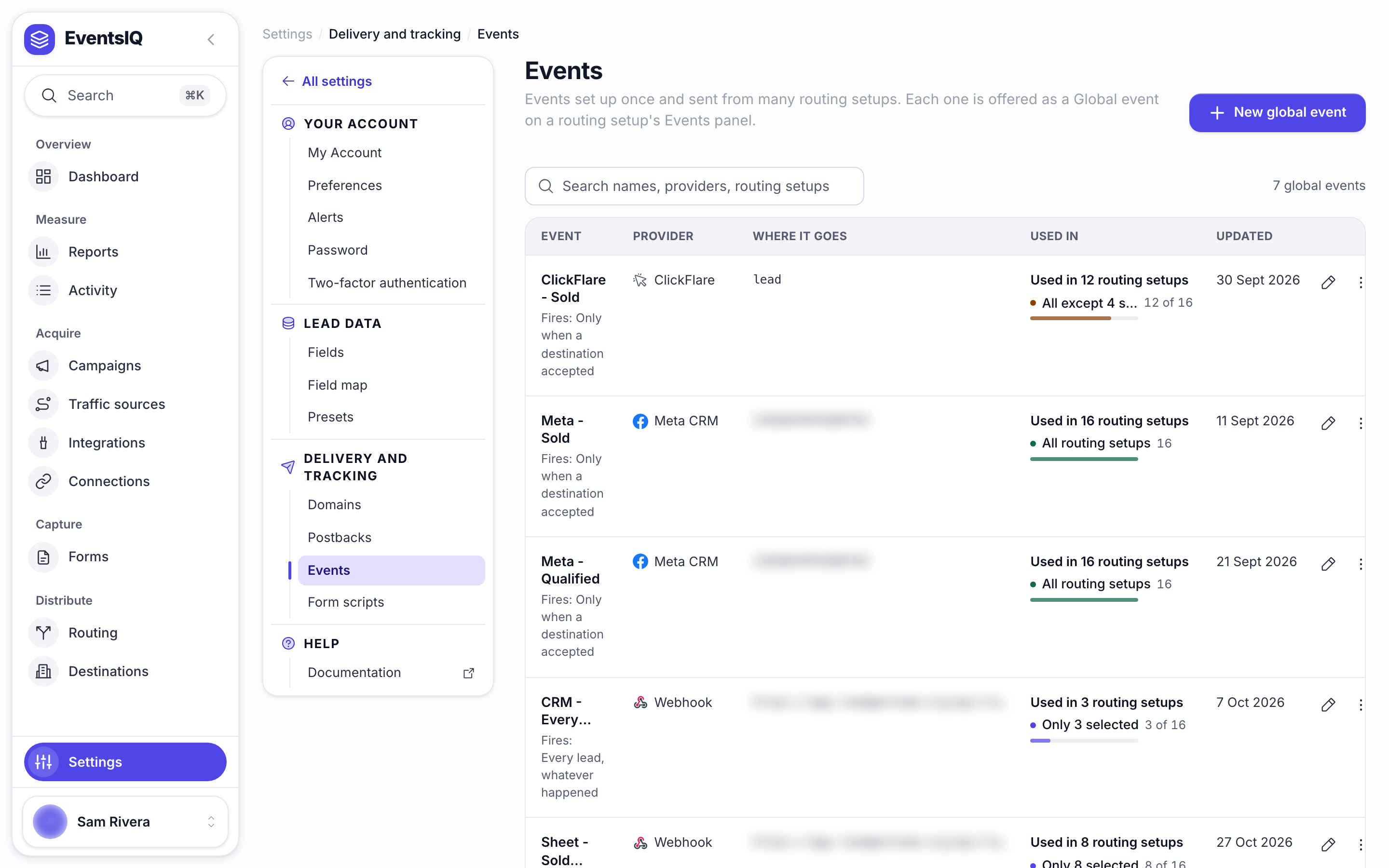
| Column | What it tells you |
|---|---|
| Event | Its name |
| Provider | Where it goes, for example Google postback or Meta suppression list |
| Where it goes | The audience, conversion action, pixel or address |
| Used in | Which routings use it |
A global event that a routing still links to cannot be deleted. The dialog names the routing so you can unlink it first.
Creating a global event
Click New global event. A sheet opens with two parts: Name and where it applies, then Where it goes.
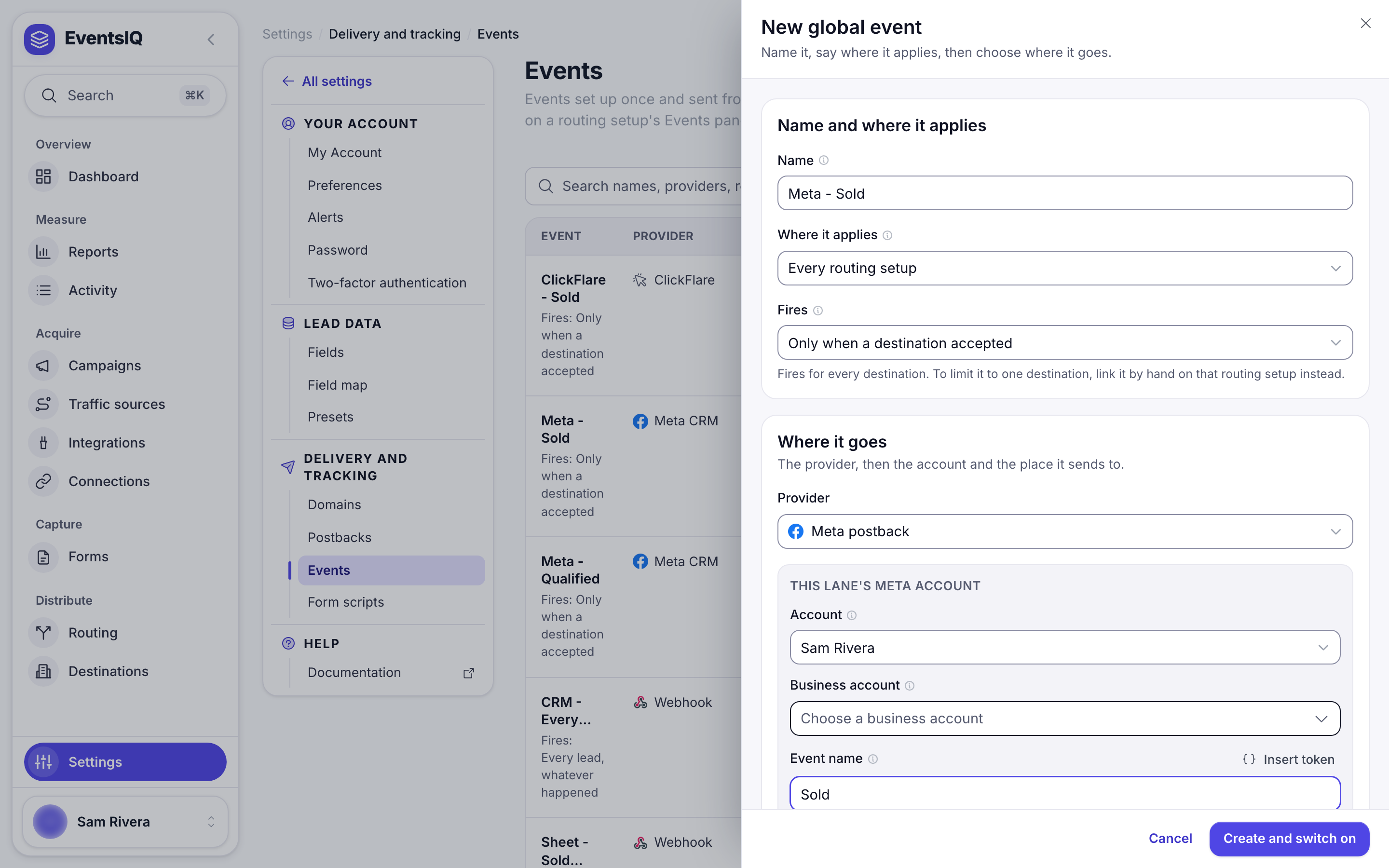
| Field | What it does |
|---|---|
| Name | How it appears in pickers, for example Meta - Sold |
| Where it applies | Link by hand on each routing setup, Every routing setup, Every routing setup except… or Only these routing setups… |
| Fires | When it fires. Shown for every choice except manual linking. See below |
| Provider | Where it goes. Each provider then asks for its own details |
A new global event starts on Every routing setup, and the button says Create and switch on. One click applies it to every routing you have, and to every one you add later. Pick Link by hand on each routing setup first if you want to choose where it runs.
Where it applies
- Link by hand on each routing setup: it only fires where a routing's CRM event picks it under Global event. Each routing decides its own Only for and Fires.
- Every routing setup, Every routing setup except…, Only these routing setups…: it fires on those routings automatically, without anything added to them. Each of those routings lists it under Also fires here, where you can still limit it with Only from.
Fires
| Option | Fires when |
|---|---|
| Only when a destination accepted | The lead sold |
| Only when every destination declined | Nobody bought it |
| Only when the visitor tapped to call | The visitor tapped a call button |
| Every lead, whatever happened | Always |
Providers
| Provider | What it does |
|---|---|
| Meta postback | Tells Meta the lead's stage, for example sold, as a CRM event. Listed as Meta CRM |
| TikTok postback | The same for TikTok |
| Google postback | Reports the outcome to a Google Ads conversion action |
| Snapchat postback | Tells Snapchat what became of the lead, as an offline event on a Snap Pixel. Pick the account, ad account and Pixel, then an event from Snapchat's list or From the lead's data |
| ClickFlare | Reports the conversion to ClickFlare |
| Webhook | Posts the outcome to any address you give it |
| Meta suppression list | Adds the person to a Meta customer list audience |
| TikTok suppression list | Adds the person to a TikTok customer file audience |
| Google suppression list | Adds the person to a Google Ads customer list |
| Snapchat suppression list | Adds the person to a Snapchat customer list |
For Meta, TikTok and Webhook you also set Stage on sale and Stage on decline: the words sent
for each outcome, sold and unsold by default.
Google postback
The Google postback reports what happened to the lead to a Google Ads conversion action. Google has no stage field, so each outcome names the action that stands for it.
| Field | What to put |
|---|---|
| Account | Your Google connection |
| Google Ads account | The account the conversion actions belong to. Leave empty and a Google lead form's own account is used |
| When a destination bought the lead | Usually a Converted lead action. The sale price is sent with it |
| When no destination bought it | Almost always empty. Leave empty (recommended) |
Only Import from clicks conversion actions are listed, because those are the ones Google accepts uploads for. Create one in Google Ads under Goals → Conversions if the list is empty.
Each conversion carries the lead's gclid when it has one, and the hashed email, phone and address,
so Google can match it either way. The gclid comes from a Google lead form,
the landing page's address, or an inbound webhook that sent it.
If you pick an action for When no destination bought it, make it a separate action set as Secondary in Google Ads. Reusing your sale action would tell Google that unsold leads are wins, and its bidding would chase more of them.
With Fires on Every lead, whatever happened and no decline action, an unsold lead sends nothing and writes no log row. That is expected.
Suppression lists
A suppression list is an audience your ads exclude, so you stop paying to reach people who already converted. These providers add each lead's email and phone to an existing list. A lead with neither is skipped, and its log says so.
| Network | Fields | Which lists | When it is sent |
|---|---|---|---|
| Meta | Account, Ad account, Audience | Customer list audiences. Create a new audience makes an empty one | Straight away. Meta takes up to 24 hours to update |
| TikTok | Account, Advertiser account, Audience | Customer file audiences | Queued, then uploaded on the Send to TikTok schedule (every 6 hours by default). Sync now sends it immediately. TikTok takes 24 to 48 hours |
| Account, Google Ads account, Customer list | Customer lists built from contact details. Create a new customer list makes an empty one | Straight away. Google takes up to 48 hours | |
| Snapchat | Account, Ad account, Customer list | Customer lists already on that ad account | Straight away, email and phone separately. Snapchat can take a few hours to match a new person |
A TikTok lead that is waiting for the next upload shows as Pending in Logs, then Success once it is sent.
Google only allows customer lists on ad accounts that are eligible for Customer Match, which Google decides from the account's policy and payment history. On an account that is not, creating a list fails with a message saying so. Pick another ad account for the list.
Adding people to a list does nothing until your ad sets exclude that list. Meta's audience picker warns you when no live ad set excludes the one you picked. On Snapchat, add the list under Exclude in each ad set's audience settings in Snapchat Ads Manager.
Using a global event on a routing
On a routing's Events tab, open CRM events and click Add a CRM event. Under Global event, pick it by name. The card then shows only:
- Only for: Any destination, or one destination in this routing.
- Fires: when it fires on this routing.
Edits to the global event change every routing that uses it. To change it for one routing only, click Make this routing's own copy.
The reverse also works: configure a CRM event inline with Configure inline, then open Save as global event, give it a name and click Save. It becomes a global event and the lane links to it.
Only from
On an inline event, and on events listed under Also fires here, Only from limits it to leads from certain places: EventsIQ form, Facebook Lead Ads, TikTok Instant Forms, Google Ads lead form, Snapchat Lead Ads or Inbound webhook. Nothing ticked means every platform.
A lead from somewhere else is skipped with the reason in its log, for example "this lead arrived from Google Ads lead form, and the event is set to EventsIQ form only". That is the rule working.
Form scripts
A form script is a tag or snippet, such as TrustedForm, reCAPTCHA or Google Tag Manager, that you set up once and that many of your website forms load. You'll find them under Settings → Delivery and tracking → Form scripts.
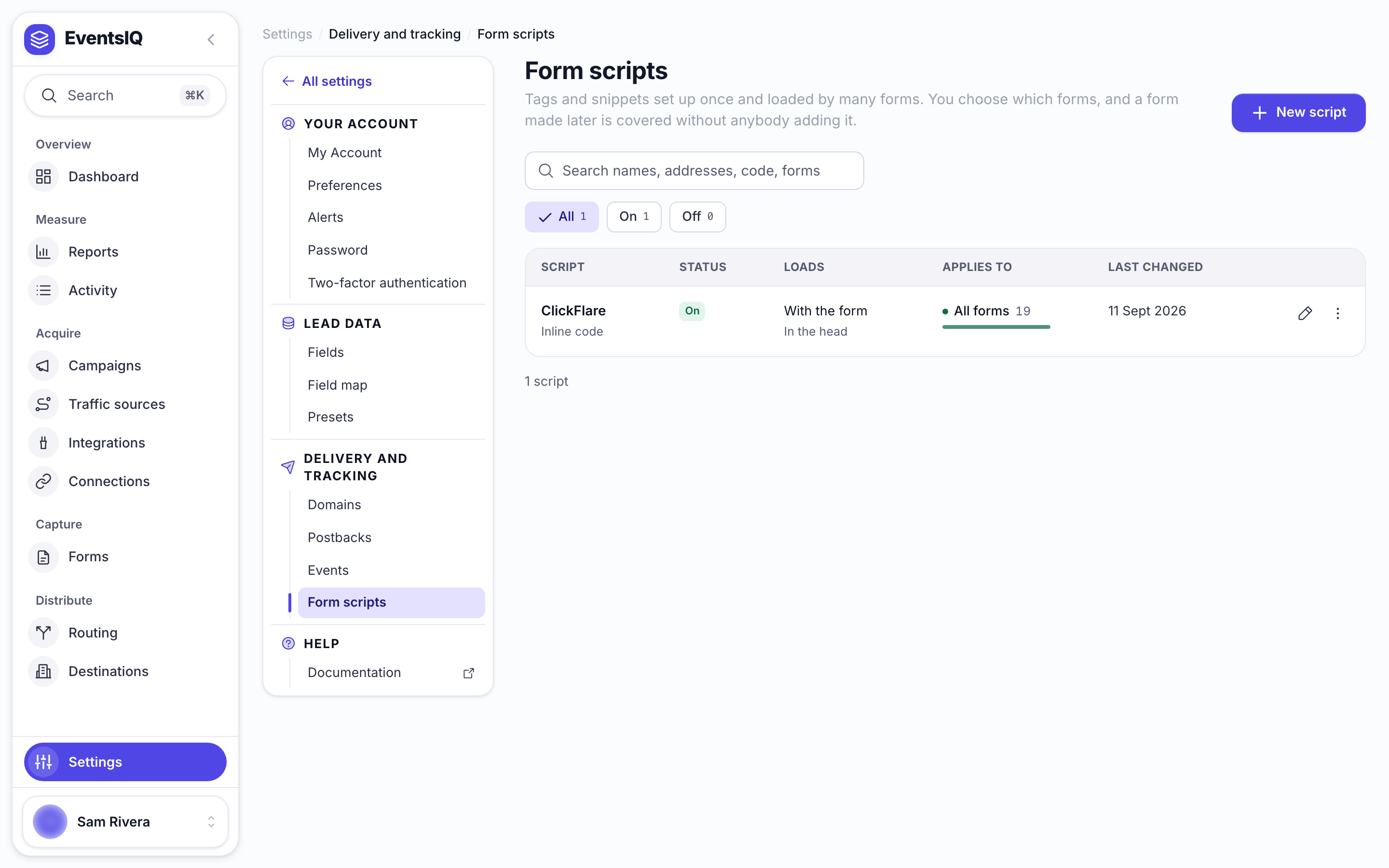
| Column | What it tells you |
|---|---|
| Script | Its name, and whether it is inline code or loaded from an address |
| Status | On, Off (saved, loads on no form) or Not finished |
| Loads | When it loads |
| Applies to | Which forms load it, with a count |
| Last changed | When it was last saved |
Not finished means the script still holds a preset's placeholder, so it loads and does nothing until you paste your own snippet or key.
Adding a form script
Click New script.
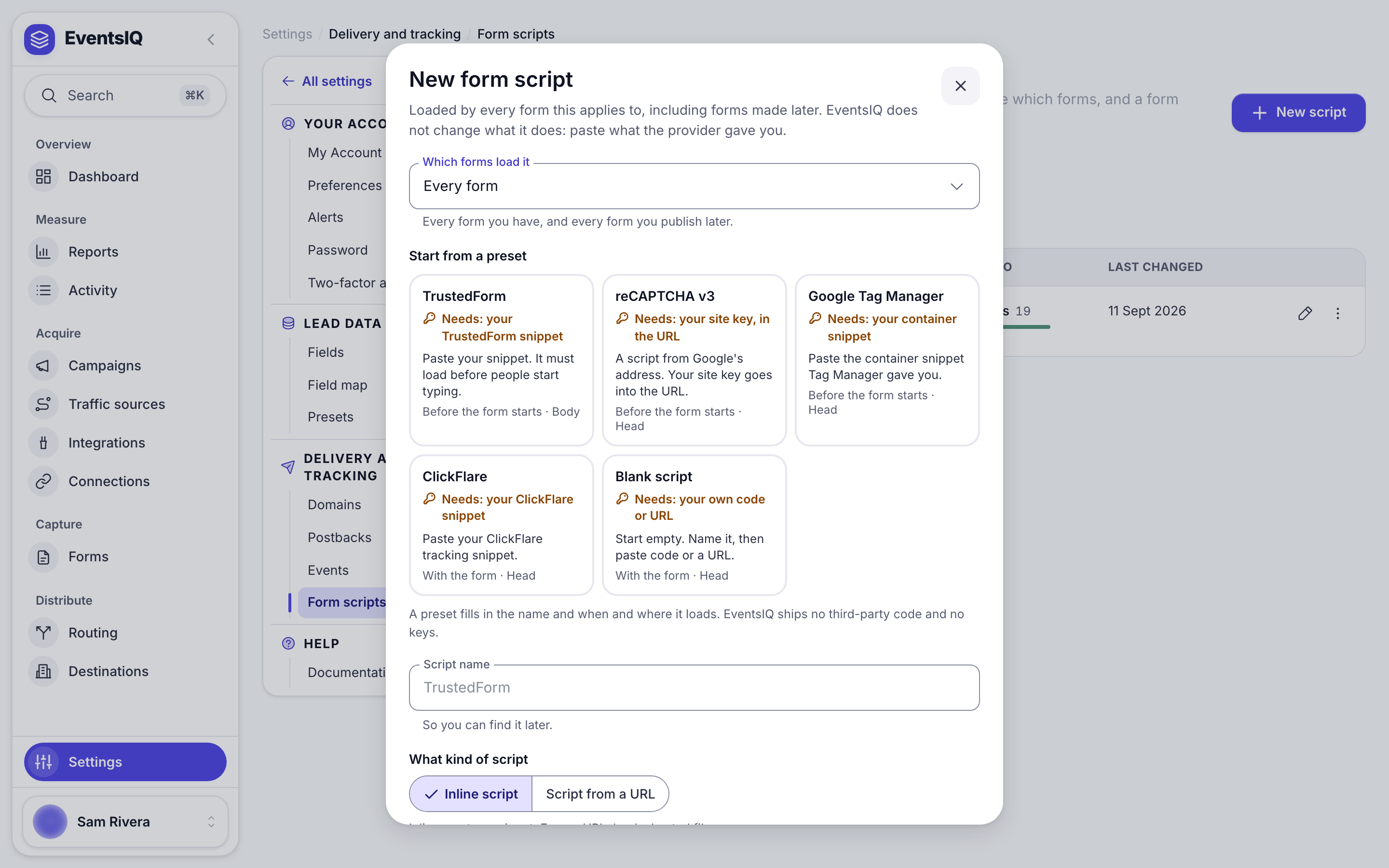
| Field | What it does |
|---|---|
| Which forms load it | Every form, Every form except the ones I pick, Only the forms I pick or Only forms that add it themselves |
| Start from a preset | TrustedForm, reCAPTCHA v3, Google Tag Manager, ClickFlare or Blank script. A preset fills in the name and when and where it loads. Each says what you still need, for example your site key |
| Script name | So you can find it later |
| What kind of script | Inline script to paste a snippet, or Script from a URL to load a hosted file |
| When to load | Before the form starts, With the form or After the form shows |
| Where to add it | Head or Body. When and where are independent, so any pair works |
| On | A script that is off stays saved but never loads |
Insert token above the code adds a value from the visit, such as a query parameter from the
page's address, for example utm_source.
Every form includes every form you publish later, without anybody adding it. With Every form except the ones I pick, a new form is included unless you exclude it too. With Only the forms I pick, a new form is left out until you add it.
EventsIQ ships no third-party code and no keys, and does not change what a script does: paste what the provider gave you. TrustedForm and reCAPTCHA need to load Before the form starts, which is what their presets pick.
Related
- Routing: the Events tab in context.
- Website form: the forms that load form scripts.
- Postbacks: conversions your CRM reports later.
- Logs: checking that an event fired.