Integrations
Conversion API and cost tracking: where sales are reported and where spend is read from.
An integration is what flows between EventsIQ and an ad network. There are two kinds:
- Cost tracking reads what your campaigns spent, so Reports can show spend next to revenue.
- Conversion API sends events back to a pixel or Google Ads account, so the network learns which clicks turned into money.
You'll find them under Acquire → Integrations, on two tabs.
Connected Meta, TikTok, Google, Snapchat, Microsoft Ads and NewsBreak accounts are now called Connections. Branches and waterfalls are under Routing. Both used to live at this address.
An integration uses a connection to reach the network, and a traffic source to know which network and currency it is about. A campaign then picks a Conversion API integration, which is how a postback for one of its leads knows where to go.
Which networks are supported
| Network | Cost tracking | Conversion API |
|---|---|---|
| Meta | Yes | Yes |
| TikTok | Yes | Yes |
| Yes | Yes | |
| Snapchat | Yes | Yes |
| Microsoft Ads | Yes | Yes |
| NewsBreak | Yes | Yes |
Picking a traffic source for a network that is not supported says so on the sheet, rather than saving something that would never run.
The list
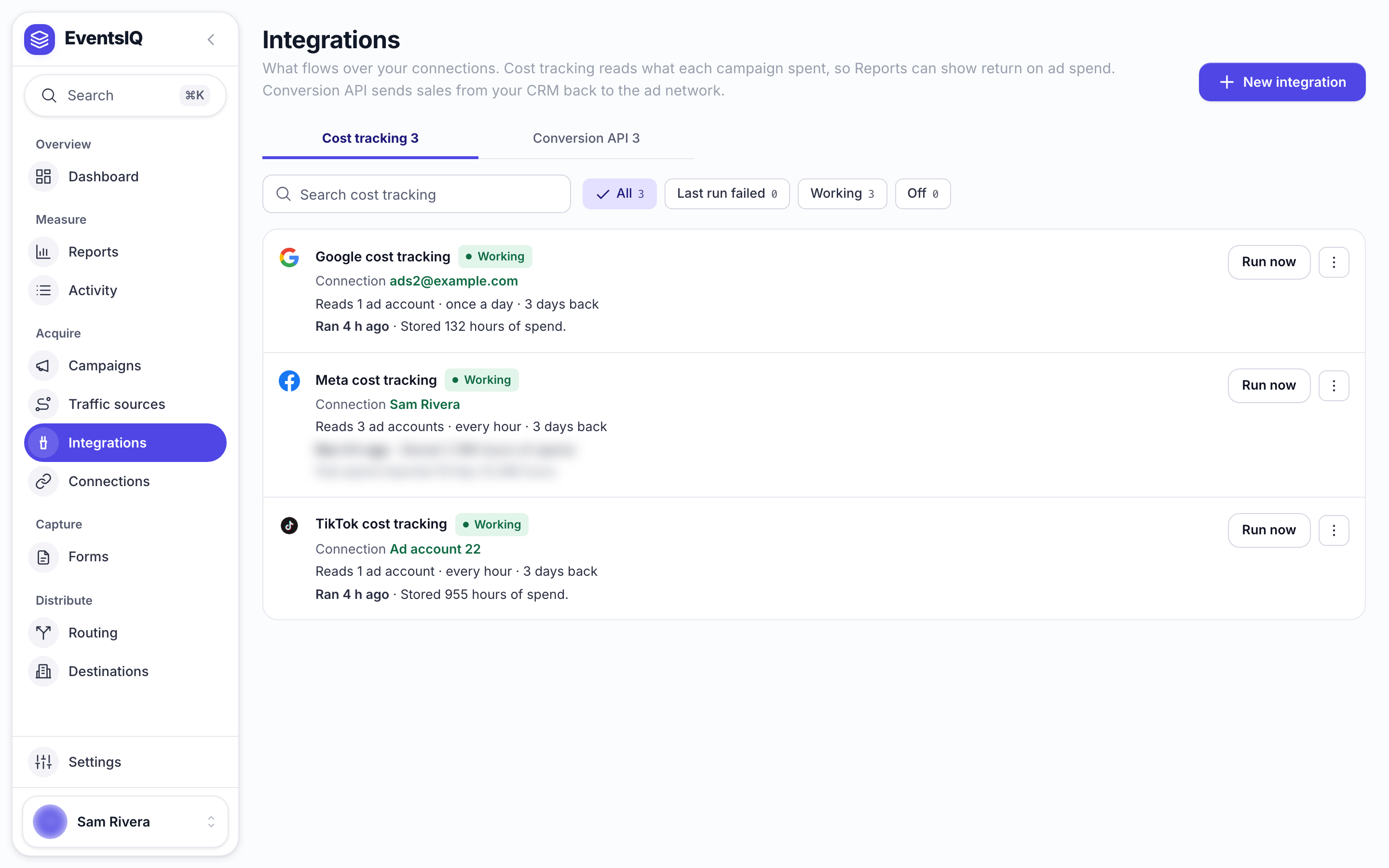
The page has two tabs, Cost tracking and Conversion API, each with how many you have. The chips filter by status: Working, Last run failed or Off. Each row shows the integration's name and network, its status, the account it uses and what it reads or sends to, and, for cost tracking, how its last run went.
A cost tracking row has Run now beside it. Its menu (⋮) also has Import past spend, Edit, Rename and Duplicate.
Fields on both kinds
| Field | What it does |
|---|---|
| Name | How it appears in pickers, for example on a campaign |
| Traffic source | The network and its currency |
| Connection | The account to use. Only connections for that network are listed. Connect a new account... opens the network's sign in in its own window |
| Notes | Anything for whoever reads this next |
| Enabled | Turn off to stop it running without deleting it |
Cost tracking
Click New integration and pick Cost tracking.
| Field | What it does |
|---|---|
| Ad accounts | Which accounts to read. TikTok calls them Advertiser accounts. Tick as many as you like |
| Run every | How often to read spend, from 15 minutes to 24 hours. 60 minutes is the default |
Each run reads spend per campaign, per hour. It re-reads the last three days every time, because networks keep correcting their figures for a few days after the fact.
Spend is counted in each ad account's own currency and time zone.
The schedule checks in on its own rhythm, so a run happens at least that far apart, not exactly on the minute. A very short interval mostly re-reads figures that are still changing.
Row actions
| Action | What it does |
|---|---|
| Run now | Reads spend straight away instead of waiting for the schedule |
| Import past spend | Reads spend for a date range you pick, for example when you first connect an account |
| Remove spend it no longer reads | Clears spend from ad accounts you have unticked, so it stops counting in Reports |
Conversion API
Click New integration and pick Conversion API. After the fields above, pick where events go:
| Network | Fields |
|---|---|
| Meta | Business account (optional, narrows the list), then the Pixel |
| TikTok | Advertiser account (optional), the Pixel, and a Pixel access token only if TikTok refuses without one |
| Snapchat | Ad account, then the Pixel. It lists your Snap Pixels. A Snap App ID does not work |
| The Google Ads account | |
| Microsoft Ads | The Microsoft Ads account. Each postback event then picks one of its offline conversion goals |
| NewsBreak | The NewsBreak ad account. Each postback event then picks one of its Postback events |
Currency is what sale values are reported in. Leave it empty to use the traffic source's currency. Snapchat only takes some currencies, such as USD, EUR and GBP. The sheet will not save a currency Snapchat refuses, and warns you when the traffic source's currency is one it refuses.
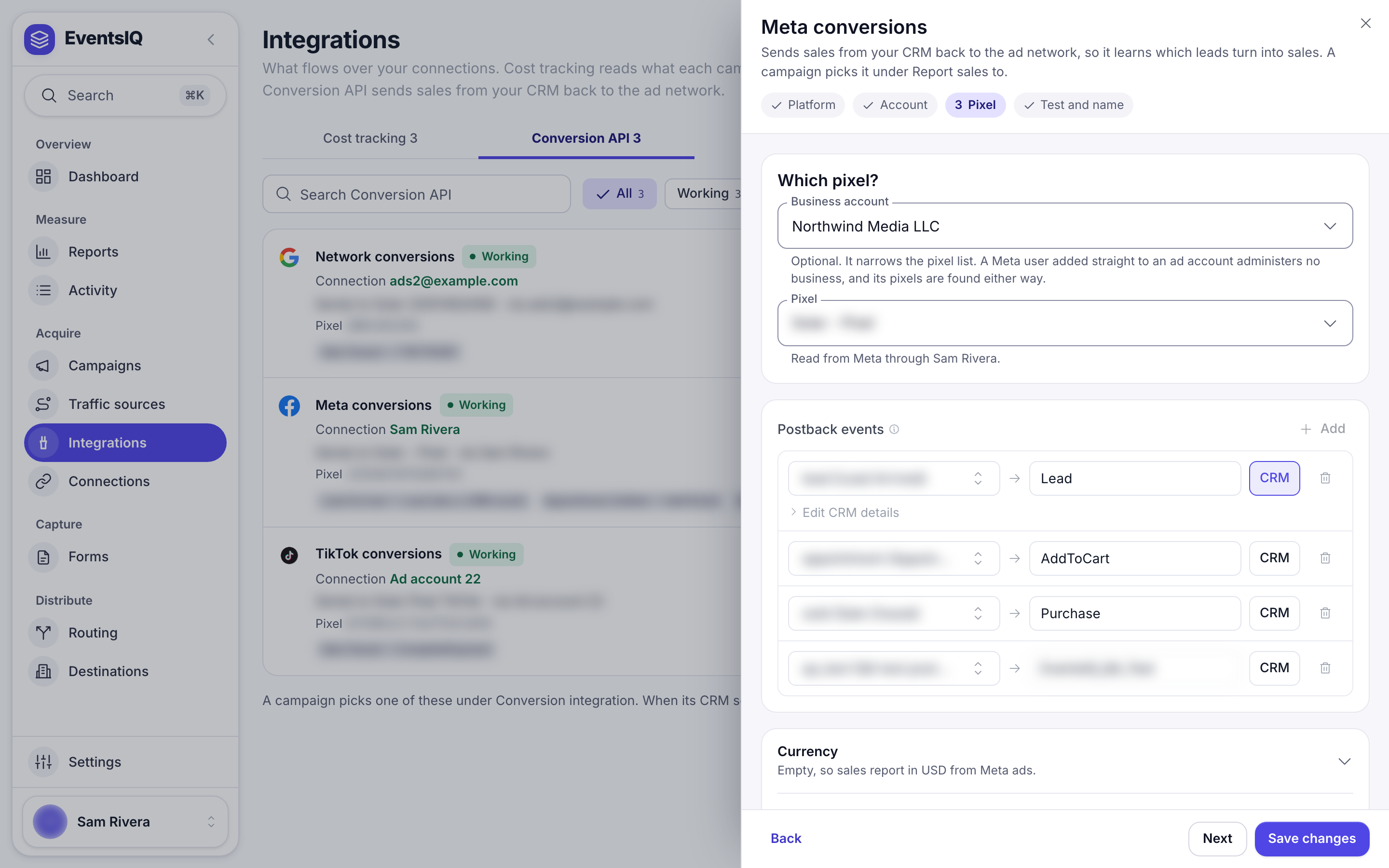
Postback events
This is the important part. Each row says: when my CRM reports this event, send the network that event.
- Click Add.
- On the left, pick one of your postback events, for example
sold. - On the right, type the name the network should receive, for example
Purchasefor Meta. For Google you pick one of your Import from clicks conversion actions instead. For Snapchat you pick from Snapchat's own list, for examplePURCHASEorSIGN_UP, because Snapchat refuses any other name. For Microsoft Ads you pick one of the ad account's offline conversion goals. See Microsoft Ads. For NewsBreak you pick one of the ad account's Postback events. See NewsBreak. - Meta only: turn on CRM to send it as a CRM event instead of a conversion. Edit CRM details
then lets you set
lead_event_source,event_sourceandlead_status.
EventsIQ warns you on a row when the postback event is turned off, when Purchase (or Snapchat's
PURCHASE) is sent with no value, or when the name is not one of the network's standard events. The
last step repeats the Purchase warning, because the network refuses that event without a value.
An integration with no Postback events rows sends nothing, whatever your CRM reports. The sheet says None mapped, so postbacks send nothing to this pixel.
What gets sent
Built from the lead lists what EventsIQ fills in for you: hashed email, phone, name and location,
the network's own click ids (fbc and fbp for Meta, ttclid for TikTok, ScCid for Snapchat,
gclid for Google), the
IP address and browser where the network allows them, the sale value, and the event time. You do not
configure these.
Your own fields adds extras to the event's custom data. Give each a name and a token, for example
lead_score and {{data.score}}.
For Google, each conversion carries the click id and the hashed contact details together, and Google matches on whichever it can. The visitor's IP is only sent for website form leads, and never for people in the EEA, the UK or Switzerland.
Deleting
Deleting a cost tracking integration stops future reads. Spend already read stays in Reports until you remove it. Deleting a Conversion API integration leaves any campaign that picked it with nothing to send postbacks to, so pick another on those campaigns.