How EventsIQ Works
The shape of the system: sources, canonical fields, routing and destinations.
EventsIQ captures leads from several places, puts them all into one shape, and then offers each one to the destinations you have configured until somebody takes it.
If you buy traffic, it also records which ad each lead came from and reports every sale back to the ad network, so you can see what each campaign really earns.
This page explains the shape of the system so the rest of the documentation makes sense. If you would rather start doing than reading, go straight to Your first website form.
The five places a lead can arrive from
EventsIQ calls all of them sources, and treats them identically once the lead is inside.
| Source | Where the lead comes from | Where you set it up |
|---|---|---|
| Website form | A form you build in EventsIQ and embed on your own site | Forms → New form |
| Facebook Instant Form | A Meta Lead Ads form attached to a Page you manage | Forms → New form |
| TikTok Instant Form | A TikTok Lead Ads form on an advertiser account | Forms → New form |
| Snapchat lead form | A Snapchat Lead Ads form on an ad account | Forms → New form |
| Google Ads lead form | A lead form asset on a Google Ads campaign | Forms → New form |
| Inbound webhook | Anything that can send an HTTP POST | Forms → New form |
Only the first one involves the form builder. The other four already have a form, somebody else's, so the job there is translating their field names into yours.
The path a lead takes
Read left to right, that is: something sends a lead, EventsIQ renames its fields into a vocabulary you control, a routing setup decides which destinations should see it and in what order, and the first destination to say yes gets it.
The five ideas worth learning once
Sources are interchangeable. A Facebook lead and a webhook lead are handled exactly the same way once they are inside. Anything you configure downstream (presets, destinations, events) works for all of them without being written twice.
Canonical fields are the shared vocabulary. Your Facebook form calls it
field_data[phone_number], your website form calls it phone_number, and your destination expects
primary_phone. EventsIQ's answer is a fixed middle name, phone, that everything else speaks.
Translating a source's field names into canonical keys is called field mapping, and it is the
one piece of setup per source that nothing else can do for you. See Fields.
A routing setup is reusable. It is not owned by a form. It is a library object that holds your routing rules, and many forms can point at the same one. Change the destination order in one place and every form using that routing setup follows.
A branch is a preset plus an ordered list of destinations. Presets decide whether a group of destinations gets the lead; the order of the list decides who gets first refusal. That ordered list is the waterfall.
At most one sale per lead. The waterfall stops at the first destination whose response satisfies its accept rule. Destinations below that one are never called. There can be many outbound calls per lead, but never two sales.
Where to start
Do it in this order. Each step is useless without the one before it.
- Fields: check the canonical fields cover what your destinations ask for. Add any that are missing.
- Destinations: add at least one destination, with an accept rule that describes what a "yes" looks like from them.
- Presets: only if you need to send different leads to different destinations. A single default waterfall needs no presets at all.
- Routing: put those pieces together into the routing a lead will actually run through, and switch it live.
- Your first website form or Facebook Instant Forms: capture something.
You can also do it backwards: build a form first and route it later. EventsIQ will let you, and the form's settings page will warn you clearly that leads are being stored but not sold.
Where things live in the menu
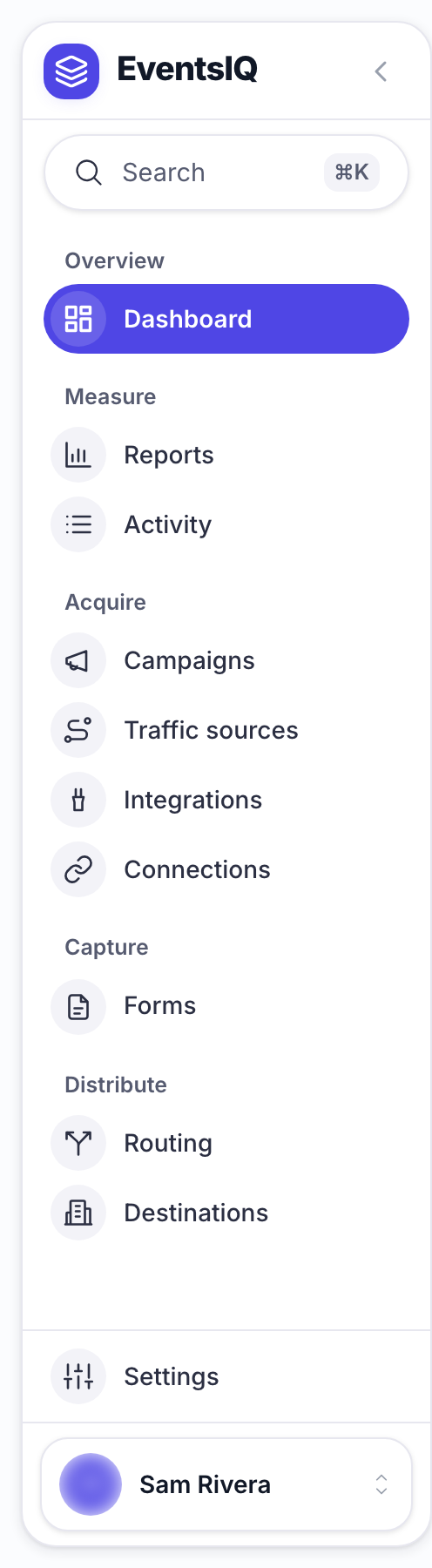
The sidebar is grouped by what you are doing. Search at the top, or ⌘K, finds any page. The arrow beside the logo switches to icons only.
| Group | Item | What it is for |
|---|---|---|
| Overview | Dashboard | Today's leads, sales and anything that needs attention |
| Measure | Reports | Spend, revenue, profit and ROAS |
| Activity | Leads, and the Logs of every call made about them | |
| Acquire | Campaigns | The links that go in your ads |
| Traffic sources | One per ad network, with its macros and currency | |
| Integrations | Where conversions are sent and where spend is read from | |
| Connections | Your Meta, TikTok, Google and Snapchat logins, plus API accounts for CRMs | |
| Capture | Forms | Every capture you have, of every type, and the button that makes new ones |
| Distribute | Routing | The routing library, with its branches, waterfalls and events |
| Destinations | Who you sell to, and what their "accepted" response looks like |
Settings holds the rest: Notifications, as Alerts, under Your account; Fields and Presets under Lead data; and Domains, Postbacks, Events and Form scripts under Delivery and tracking.
If you run paid traffic, read How click tracking works next.