How Click Tracking Works
Tracking domains, campaigns, clicks and postbacks: how a lead learns which ad it came from.
Click tracking answers one question: which ad produced this lead, and what was it worth?
EventsIQ records every paid click on its way to your landing page, gives it an id, and joins that id to the lead the visitor submits. From then on the lead knows its campaign, its ad, its ad set and its click id. That is what lets EventsIQ tell the ad network about the sale, and what lets Reports put spend and revenue side by side.
This page explains the pieces and how they fit. If you would rather set it up step by step, go straight to the guide: Set up paid traffic.
The pieces at a glance
| Piece | What it is | Where you set it up |
|---|---|---|
| Tracking domain | A subdomain of yours, like track.yoursite.com, that your ad links point at | Settings → Domains |
| Traffic source | One ad network, its currency, and which of its macros fill which EventsIQ field | Acquire → Traffic sources |
| Campaign | One run of paid traffic: a traffic source, a form, a landing page and the link that goes in the ad | Acquire → Campaigns |
| Click | One visit through a campaign link, with its own id | Recorded for you |
| Connection | Your login to Meta, TikTok, Google or Snapchat, borrowed so EventsIQ can act for you | Acquire → Connections |
| Integration: Conversion API | Which pixel or Google Ads account hears about sales, and which events it hears | Acquire → Integrations |
| Integration: Cost tracking | Which ad accounts EventsIQ reads spend from, and how often | Acquire → Integrations |
| Postback | A call your CRM makes later, saying "this click turned into a sale" | Settings → Postbacks |
The journey of one click
In words:
- The ad link points at your tracking domain, for example
https://track.yoursite.com/solar-us?eiq_source=…&eiq_campaign=…&campaign_id={{campaign.id}}. The network replaces each macro, like{{campaign.id}}, with the real value before the visitor arrives. - The tracking domain decides where the visitor goes. It checks the campaign's rules (country, device, time of day and so on), picks a page, records the click and gives it an id.
- The visitor lands on your page with every parameter they came with, plus
eiq_click=<id>. - The EventsIQ form on that page remembers the click id for 90 days. If the visitor comes back next week and submits, the lead still carries it.
- The lead arrives carrying the click id. EventsIQ finds the click and fills in what the page
never saw: campaign, ad set, ad, network click ids, the Meta
fbcvalue and so on. - The lead is routed as usual. When a destination buys it, EventsIQ tells the ad network.
Through your link domain, or straight to your page
A campaign's Where clicks go tab has two choices.
| Where clicks go | Where the ad points | What you get |
|---|---|---|
| Through your link domain | Your tracking domain | Every click recorded, plus rules and split tests across landing pages |
| Straight to your page | Your landing page itself | No extra hop. The form on the page asks EventsIQ for a click id instead |
Through your link domain needs a tracking domain that is Live. Until you have one, it is greyed out and every campaign goes straight to your page.
How a lead finds its campaign
Not every lead comes through a link. How a lead is matched to its campaign depends on what kind of form the campaign runs on, and the campaign sheet tells you which one applies.
| The campaign runs on | How the lead is matched | What you have to do |
|---|---|---|
| A website form | By URL: the parameters in the ad link | Paste the tracking URL into the ad |
| A Facebook, TikTok, Google or Snapchat instant form | By network: the network names its campaign on every lead | Pick the Ad campaign on the campaign's General tab |
| An inbound webhook | By caller: whoever posts the lead sends the parameters | Ask the sender to include the parameters as fields |
Instant forms open inside the network's app, so there is no page and no click to record. The network sends its own campaign id with every lead instead, and that is enough to join spend and sales.
What the click adds to a lead
The click fills gaps. It never overwrites.
If the lead already has a campaign id, because the page passed one, the click leaves it alone. This matters because a visitor can come back through a newer ad while an older click id is still in their browser. Letting the old click win would replace a right answer with a stale one.
The click also never sets the IP address or browser of the lead. Those describe the moment the form was submitted, which is the moment a conversion is reported for.
Occasionally the lead is saved a moment before its click. That is fine: when the click arrives, EventsIQ fills the lead in then. The lead's log says so while it waits.
Where you can see clicks
There is no separate list of clicks. You see them where they are useful:
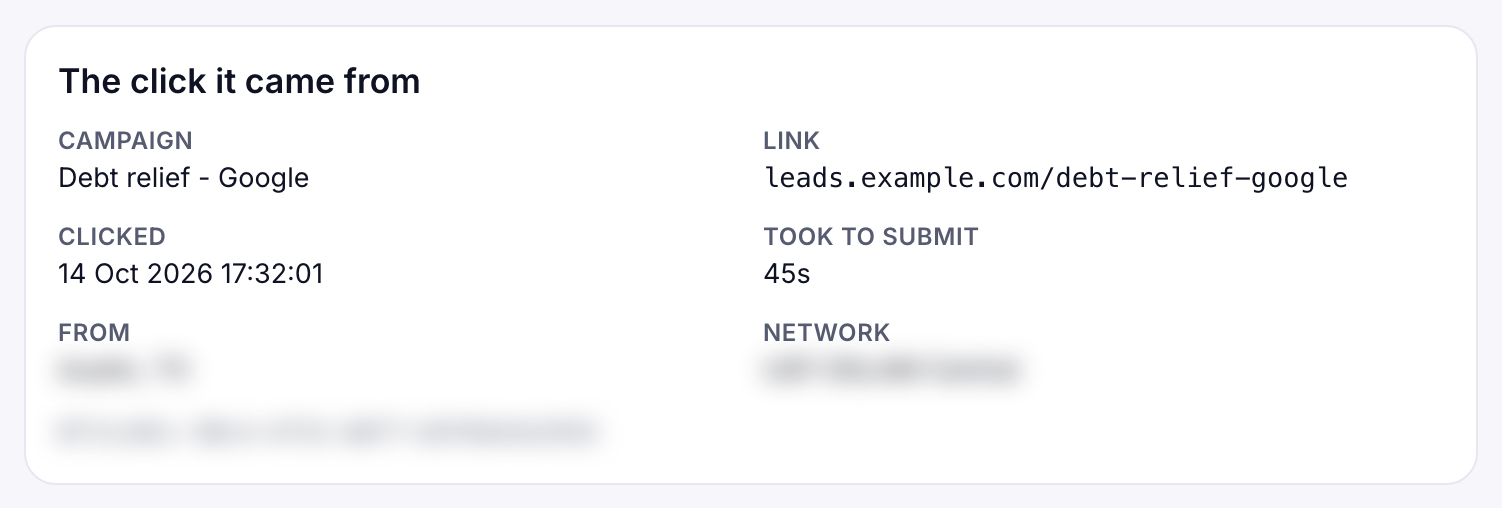
- In a lead's log. Open any lead in Logs and look for The click it came from: the campaign, the link, when they clicked, how long they took to submit, where they were and the click id.
- In Reports. Group by Campaign and turn on the Tracked clicks, Cost per click and Click to lead % columns. A campaign that splits traffic across pages also gets a Split test table, so you can see which page converts.
Two ways a sale gets back to the network
At the moment of sale. When the waterfall finishes, the routing's CRM events fire. A Google postback reports the sale to a Google Ads conversion action, and a Meta, TikTok or Snapchat postback tells the network the lead's stage. See Routing → Events and Global events.
Later, by postback. Many sales happen days later in your CRM. The CRM calls EventsIQ's postback
URL with the click id and an event name, for example sold. EventsIQ finds the click, then its
campaign, then the campaign's Conversion integration, and sends the event there. See
Postbacks.
The event never names a pixel. Five campaigns on three ad accounts can all send sold, and each one
reports to its own pixel, because the campaign decides where it goes.
Spend and return on ad spend
A Cost tracking integration reads spend from your ad accounts every hour or so, per network campaign. Reports then join that spend to your leads by the network's campaign id and the day, so each row shows spend, revenue, profit and ROAS together.
What to read next
- Set up paid traffic: the whole setup, step by step.
- Campaigns: every tab and field.
- Postbacks: reporting sales that happen later.