Inbound Webhook
Accept leads from anything that can send an HTTP POST.
An inbound webhook is a private EventsIQ address that accepts leads from anything that can send an HTTP POST: Zapier, a call center's software, another form tool, or your own code. Each webhook source gets its own address, and leads posted to it are mapped and routed like any other.
Step 1: Create the endpoint
- Go to Forms, click New form, give it a name, for example
Zapier - solar leads, and pick Webhook. - On Where leads go, pick a routing and click Continue, or click Decide later.
- Click Create endpoint.
EventsIQ shows:
| Value | What it is |
|---|---|
| Endpoint URL | https://app.eventsiq.io/api/hooks/in/<key>. The key in it is the password |
| Signing secret | Optional extra security. See Signatures |
| Try it | A ready to paste curl command |
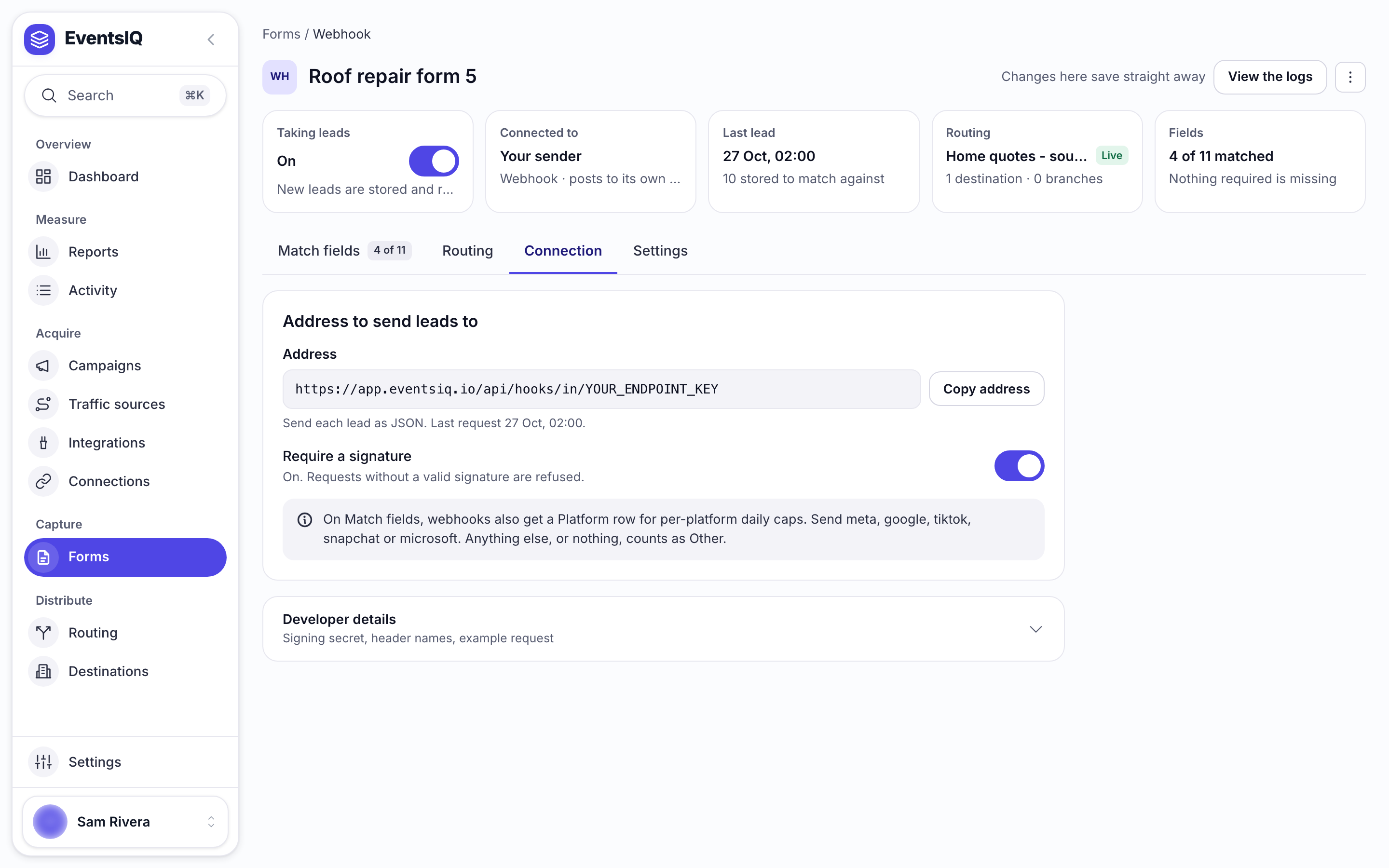
The address is always on the source page too: open the form from the Forms list, then its Connection tab, under Address to send leads to.
Step 2: Send a lead
Point the sending system at the Endpoint URL and send a POST:
curl -X POST "https://app.eventsiq.io/api/hooks/in/YOUR_ENDPOINT_KEY" -H "Content-Type: application/json" -d '{"first_name":"Jane","last_name":"Doe","email":"jane@example.com","phone":"5551230000","state":"TX"}'EventsIQ accepts:
- JSON: an object. Anything else is wrapped as
{"payload": ...}. - Form encoded:
application/x-www-form-urlencoded, like a plain HTML form. - Bodies up to 128 KB.
The reply tells the sender what happened:
| Reply | Meaning |
|---|---|
| 200 | {"received":true,"leadId":"...","duplicate":false}. Stored |
| 400 | The body could not be read |
| 401 | Invalid signature. Only when signatures are required |
| 404 | Unknown endpoint. The address is wrong, or the source is turned off |
| 413 | The body is over 128 KB |
| 429 | Too many requests from one address: more than 300 a minute. Wait for Retry-After |
Step 3: Match up the fields
Every top level key in the body becomes an answer you can map on Match up the fields:
first_name, email and so on. Nested objects are reachable through mapping paths. EventsIQ keeps
the last ten payloads, so you can map against real data. See Fields.
Passing attribution
If the sender knows where the lead came from, it can send that too, as ordinary fields in the body or
in the address's query string. These keys are kept as the lead's attribution, available as
{{runtime.key}}:
| Purpose | Keys |
|---|---|
| Click ids | gclid, fbclid, fbc, fbp, msclkid, ttclid, ttp, sccid, scid, click_id |
| UTM tags | utm_source, utm_medium, utm_campaign, utm_term, utm_content |
| Pages | landing_url, page_url, referrer |
| The visitor | client_ip_address, client_user_agent |
| Your own ids | sub_id, affiliate_id, session_id, visitor_id |
| EventsIQ tracking | traffic_source_id, eiq_campaign_id, eiq_click_id |
The most useful one is eiq_click_id. If the lead first came through an EventsIQ
campaign link, send the click id back and the lead is joined to its click:
campaign, ad and all. A gclid sent this way is used by the
Google postback.
eiq_click_id and eiq_campaign_id used to be called formwork_click_id and
formwork_campaign_id. A sender that still posts the old names keeps working, with no end date, and
{{runtime.formwork_click_id}} in a body template still fills in. New setups should use the eiq_
names.
The visitor's IP and browser
EventsIQ records the IP address and browser of whatever connects to it, and for a webhook that is the sending server, not the person. EventsIQ never sends those to Meta, TikTok, Snapchat or Google as the visitor's.
If your system collected the lead in a browser, pass the person's own details:
client_ip_address: the visitor's IP, for example73.12.45.9. Anything that is not a valid IP is ignored.client_user_agent: the visitor's browser string.
They are sent to the networks as the visitor's IP and browser. With client_user_agent and
page_url both present, a Meta event is sent as a website event, which Meta matches better than a
system event.
The received time and the connecting IP and browser are always set by EventsIQ. A webhook also cannot
set campaign_id or ad_id directly: send eiq_click_id instead and EventsIQ fills them in from
the click.
Duplicates
Systems retry. To stop one lead being sold twice:
- Send an
Idempotency-Keyheader (orX-Idempotency-Key) that is unique per lead. A repeat with the same key is answered with"duplicate":trueand not stored again. - Without one, an identical body posted again within the same clock hour is treated as a duplicate.
Signatures
The endpoint key in the address is enough to start with. For more protection, turn on Require a
signature on the source page's Connection tab. Every request must then carry an
X-EventsIQ-Signature header: the HMAC-SHA256 of the raw body, in hex, using the Signing secret,
which is under Developer details on the same tab. A sha256= prefix is accepted.
A sender set up before the rename may still send the same signature as X-Formwork-Signature. That
is accepted for now and will stop being read after 13 January 2027, so switch the header name when
you next touch the sender.
When signing is on, the Example request under Developer details shows how to compute it.
Make a new secret beside the signing secret replaces it, and the old one stops working at once. Update the sender before or straight after you do.
Related
- Fields: mapping the body's keys.
- How click tracking works: what
eiq_click_idjoins. - Destinations: the outbound side, sending leads on to destinations.