Postbacks
Let your CRM report a sale days later, by click id, without sending anything twice.
A postback is a call your CRM makes to EventsIQ, later, saying "this lead booked an appointment" or "this lead signed". EventsIQ finds the lead by its click id, works out which campaign it came from, and sends the event to that campaign's pixel or Google Ads account.
Most sales are not decided the moment a lead is bought. Postbacks are how the ad network still hears about them, so it can find you more people like the ones who actually paid.
You'll find them under Settings → Postbacks.
Your CRM only sends a click id and an event name. Everything else is already in EventsIQ:
The event never names a pixel. The campaign decides where it goes, so one postback URL serves every campaign and every ad account you have.
Your postback link
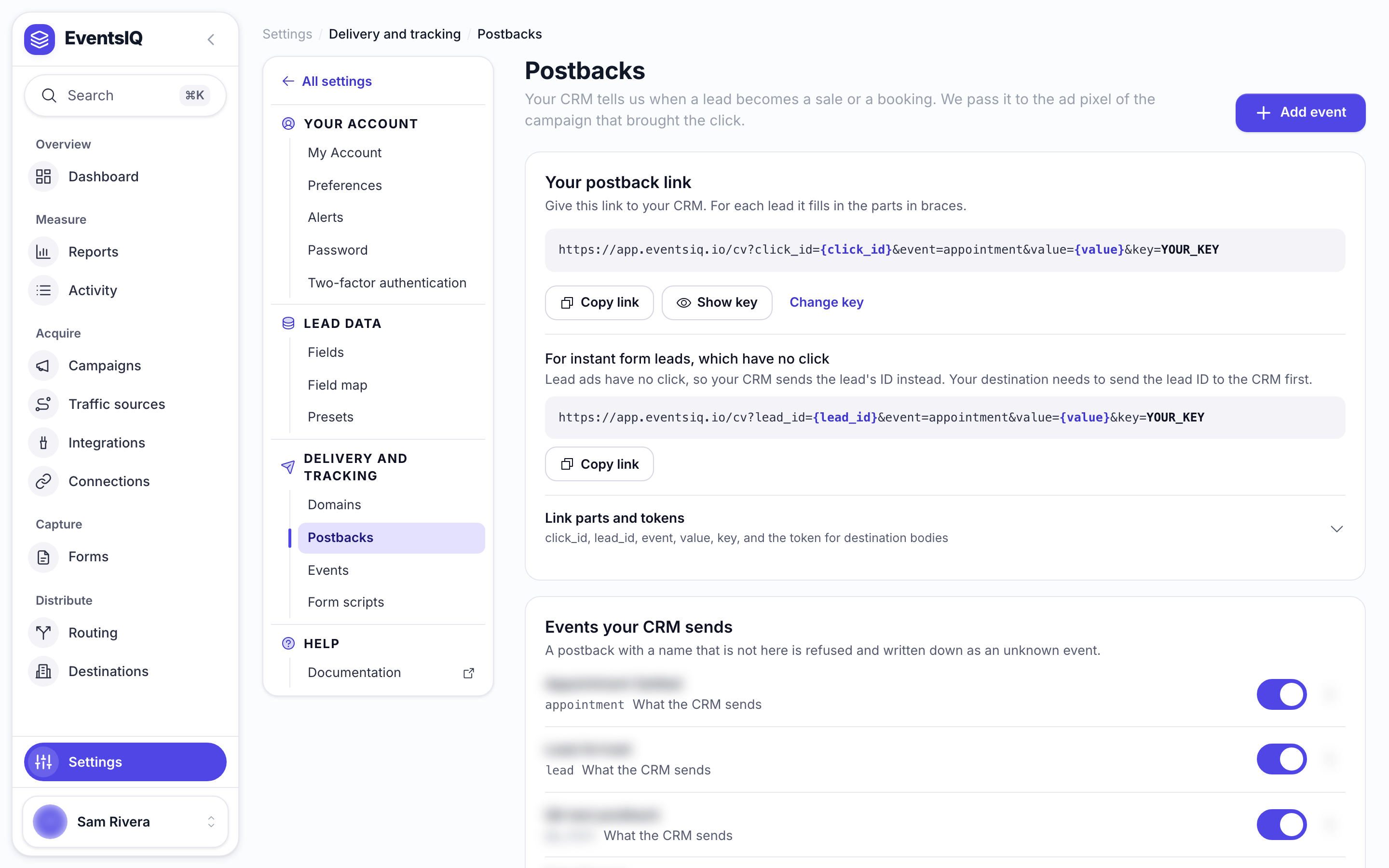
At the top of the page is your account's postback link, under Your postback link:
https://app.eventsiq.io/cv?click_id={click_id}&event=sold&value={value}&key=YOUR_KEY
Give it to your CRM, replacing the braced parts with however your CRM writes them. Click Copy link to copy it with your real key in it. Show key shows the key itself.
| Part | What it is | Other names accepted |
|---|---|---|
click_id | The EventsIQ click id stored on the lead | clickid, eiq_click, cid |
lead_id | Instead of click_id, for leads that never had a click. See below | leadid, eiq_lead |
event | One of your events below, for example sold | ct, event_name |
value | The sale amount, when the event takes one | payout, amount, revenue |
currency | Optional. Three letters, for example USD | cur |
key | Your account's key. It proves the call came from you | postback_key |
The other names exist so a CRM already set up for another tracker can be pointed at EventsIQ by changing only the address. GET and POST both work, with the values in the address, a form body or JSON.
Getting the click id to your CRM
Your CRM can only send back a click id it was given. When your routing sends the lead to the CRM,
include the click id in the body with the token {{runtime.eiq_click_id}} (the older
{{runtime.formwork_click_id}} still works). See
Destinations for body templates.
Leads without a click: instant forms
Facebook, TikTok, Google and Snapchat instant form leads are submitted inside the ad, so they never pass through a tracking link and have no click id. Report them with the lead's own id instead. The page shows this second link too, under For instant form leads, which have no click:
https://app.eventsiq.io/cv?lead_id={lead_id}&event=sold&value={value}&key=YOUR_KEY
- When your routing sends the lead to the CRM, include
{{system.lead_id}}in the body, for example"eiq_lead_id": "{{system.lead_id}}". - Have the CRM post that value back as
lead_id. - On the EventsIQ campaign for that lead ad, pick its Ad campaign. That is how a lead with no click finds its campaign, and so its conversion integration.
If a postback carries both ids, click_id is used. A sale is still reported only once per lead,
whichever id your CRM sends.
Anyone with your key and a click id could report fake sales and quietly poison what the ad network learns. If the key leaks, click Change key. The old link stops working at once, so update your CRM straight after.
Events
Events are your own names for the stages your CRM reports. Click Add event.
| Field | What it does |
|---|---|
| Name your CRM sends | The word in the postback, for example sold. Matched ignoring capitals and spaces |
| What to call it here | A readable name for your own screens, for example Sale closed |
| Value | Whatever the CRM sends, The same every time or No value at all |
| Amount | With The same every time: the fixed amount |
| Currency | Leave empty to use the integration's currency |
| Enabled | Turn off to ignore this event without deleting it |
What the ad network is told is not set here. Each Conversion API integration
maps your events to its own names under Postback events, so sold can be Purchase on Meta and
a conversion action on Google.
Testing a postback
Take a click id from a test lead (open it in Logs and look under The click it came from), then:
curl "https://app.eventsiq.io/cv?click_id=PASTE_CLICK_ID&event=sold&value=250&key=YOUR_KEY"Open Activity → Conversion logs. You should see a Postback: sold row and the event sent to the network.
Sending twice is safe
Each click can report each event once. If your CRM retries, or somebody marks the same lead sold twice, the second call is answered but nothing is sent, and the log row says already reported. That way one sale is never counted as two.
Different events on the same click are separate, so appointment and then sold both go through.
When nothing was sent
EventsIQ always answers the CRM with success, even when it sends nothing, because many CRMs retry a refused call forever. The reason is in the reply and, where EventsIQ can tell which account it is for, in Conversion logs as a skipped Postback row.
| Reason in the log | Kind | What to fix |
|---|---|---|
| No event of that name is set up here | Setup | Add the event, or fix the spelling in the CRM |
| The campaign this click came from no longer exists | Setup | Nothing to send to. The campaign was deleted |
| The campaign has no conversion integration | Setup | Pick one on the campaign's General tab |
| The conversion integration is turned off or missing its pixel | Setup | Fix the integration |
| The integration has no row for this event | Setup | Add the event under the integration's Postback events |
| CRM events can only be sent to a Meta pixel | Setup | Turn off CRM on that row, or use a Meta integration |
| That event exists but is turned off | Rule | Turn it on if you want it sent |
| Already reported for this click | Rule | Nothing. This is the double-count protection working |
Some refusals happen before EventsIQ knows whose account the call is for, so they appear only in the reply to the CRM, never in your logs:
| Reply | Why |
|---|---|
| The postback carried no click id | The CRM did not fill in click_id |
| No click here matches that id | The id is wrong, or from another account |
Unauthorized. | The key is wrong or was rotated |
| That click produced no lead here | The visitor clicked but never submitted |
| No lead here matches that lead id | The lead id is wrong, from another account, or deleted |
If a CRM says it is sending postbacks and Conversion logs shows nothing at all, it is one of these.
Run the same call with curl and read the reply.
An instant form lead has no click id, so its postback uses lead_id (see
Leads without a click). If no campaign here has its ad
campaign picked, the postback is logged as skipped with "no campaign here matches its ad campaign".
Related
- Integrations: mapping your events to what each network receives.
- Campaigns: choosing the conversion integration.
- Logs: reading Conversion logs.