Connections
Connecting Meta, TikTok, Google and Snapchat accounts, and keeping those grants alive.
A connection is your login to an account somewhere else, borrowed so EventsIQ can act on your behalf: a Meta account whose Pages run lead ads, a TikTok account with advertisers, a Google account with Google Ads accounts, or a Snapchat account with ad accounts. It can also be an API account: the address and key of a CRM or other system your routing posts to.
You'll find them under Acquire → Connections.
This page used to be called Integrations. The app now uses that word for something else: where conversions are sent and where spend is read from. That has its own page, Integrations.
One connection is shared by everything that uses it. The same Meta connection reads your lead forms, reads your ad spend and sends your conversions. Reconnect it once and all three carry on.
The list
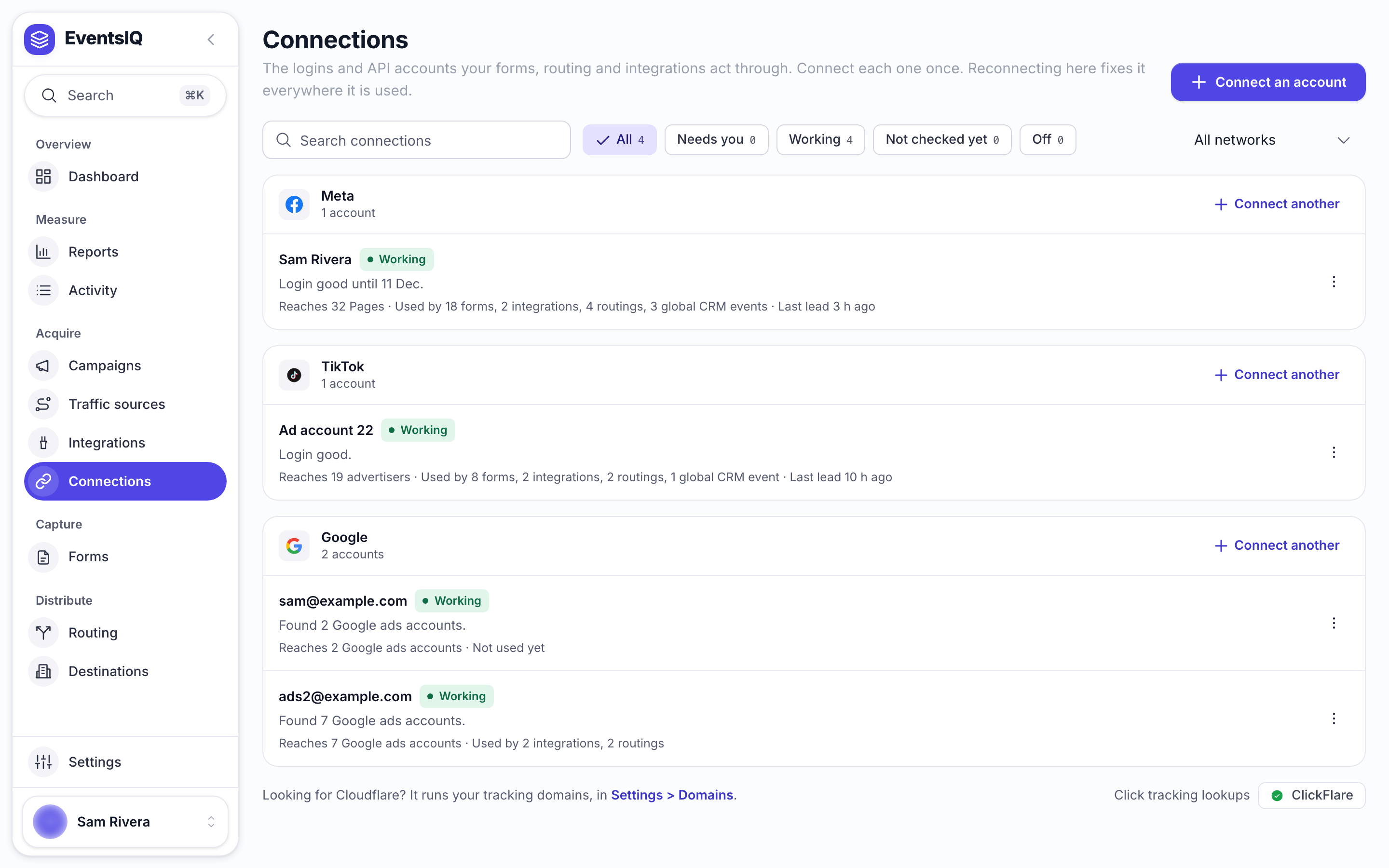
Connections are grouped by network: Meta, TikTok, Google, Snapchat, Microsoft Ads, NewsBreak, and your API accounts. Each row shows:
| On the row | What it tells you |
|---|---|
| Name | The account's name. Rename it from the row's menu |
| Status | Working, Needs you, Reconnect needed, Not checked yet or Off |
| First line | What to know now, for example Login good until 11 Dec., or what is wrong and what to do |
| Second line | What it reaches (Pages, advertisers or ad accounts), what uses it, and when its last lead came |
The chips at the top filter the list by status, and All networks narrows it to one network. Needs you collects every row that wants something from you, such as a login that ends within seven days or a missing permission.
Each row has a menu (⋮) with what you can do to that connection. Open details shows everything it reaches and everything that uses it.
What each network's connection is used for
| Network | Used for |
|---|---|
| Meta | Reading Facebook and Instagram lead forms, sending conversions and CRM events, reading spend |
| TikTok | Reading TikTok lead forms, sending conversions, reading spend |
| Reading spend, sending conversions, adding people to customer lists | |
| Snapchat | Snapchat lead ads, sending conversions and CRM events, adding people to customer lists, reading spend |
| Microsoft Ads | Reading spend, sending conversions and CRM events, adding people to customer lists. See Microsoft Ads |
| NewsBreak | Reading spend, sending conversions and CRM events, adding people to custom audiences. Connected with an Access Token, not a sign in. See NewsBreak |
Google lead forms do not need a connection at all. They deliver by webhook, with a key you paste into the form. See Google Ads lead forms.
Connecting an account
- Click Connect an account and pick the network. To add a second account on a network you already use, click Connect another on that network's group.
- The network's sign in opens in its own window, so nothing you were doing is lost.
- Sign in with an account that has admin access to the Pages, advertisers or ad accounts you need.
- Approve every permission it asks for. When the window closes, the list refreshes on its own.
You can also connect on the way through other screens. The capture wizard and the Integrations sheet both offer Connect a new account..., which does the same thing.
Meta, TikTok and Snapchat all let you untick some of the permissions they ask for, and none of them treats that as a failure. The connection then succeeds and quietly cannot do its job: leads arrive as notifications EventsIQ cannot open, or spend comes back empty.
This is the most common way a setup goes wrong, because it does not look like an error. If a connection's row says it is missing permissions, open the row's menu, pick Reconnect and approve everything.
Google: refreshing the account list
EventsIQ reads the list of Google Ads accounts you can reach when you connect. If somebody shares another account with you later, pick Refresh accounts in the row's menu to pick it up. Manager accounts are not listed, because conversions and spend belong to the accounts underneath them.
TikTok: turning on lead delivery
TikTok only sends new leads to EventsIQ for advertisers that have lead delivery turned on. Once you have connected a TikTok form, pick Turn on lead delivery in the row's menu. If an advertiser with forms is not covered, the row moves to Needs you and says how many advertisers leads arrive from, for example leads arrive from 1 of 2 advertisers.
API accounts
An API account holds the address and credentials of a system your routing posts to, so you type the key once and every destination and event that uses it picks it up. Click Connect an account and pick API account, under Your CRM or another tool.
| Field | What to put |
|---|---|
| Name | Name the account, not the vendor. Routing shows this name |
| Service | Pick one from the list or type any name |
| Web address | The start of every address you will call, for example https://api.example.com |
| How it signs in | Where the token goes: the standard place most CRMs use, a header you name, or the web address |
| Header name / Name in the web address | The name the token goes under, for example X-API-Key |
| Token | The key itself. It is saved encrypted and never shown again |
| Extra headers | Anything else every request needs, under Request format and extra headers |
Pick Test in the row's menu to check that the address answers. It calls the address once and sends no lead.
Keeping a connection alive
A connection is borrowed access, and it can be taken away without telling you. EventsIQ keeps each connection signed in by itself, so routine expiry never needs you.
It stops working when the permission itself is gone: somebody removed the app from the account, or changed a Page role so the person who connected it no longer manages it. The row then shows Reconnect needed with the reason, and you are alerted.
Leads do not error when a connection dies. The network still tells EventsIQ a lead arrived, and the fetch that follows is the part that fails. So the symptom is an absence: lead volume drops, spend stops updating, and nothing announces why.
If lead volume falls off a cliff, check this page before you look in Logs.
Snapchat renews itself
You will never be asked to reconnect Snapchat just because time passed. You only hear about it when the access itself is withdrawn. A short Snapchat outage or a busy minute does not count: the connection stays Working and EventsIQ tries again.
There is a second Snapchat difference. Meta and TikTok let EventsIQ go back and fetch leads it missed. Snapchat does not. It delivers each lead once, so a Snapchat lead that was not delivered cannot be recovered.
Reconnecting
Pick Reconnect in the row's menu. It replaces the stored token in place and changes nothing else, including the name you gave it.
Your forms, field mappings, routing, integrations and destinations all point at the connection, not the token inside it, so none of them need touching. For Meta and TikTok, leads that arrived while the connection was broken are picked up once access is back. For Snapchat they are not.
Removing a connection
Pick Disconnect in the row's menu (Delete for an API account). It checks what uses the connection first:
- Lead forms still use it. It names each one and does not disconnect. Move them to another account, or remove them, then try again.
- Only other things use it, such as integrations, routings or global CRM events. It lists what stops straight away and asks you to confirm.
- Nothing uses it. It goes at once.
An API account that anything still uses cannot be deleted: it lists where it is used, so you can point each one at another account first.
Either way you get a few seconds to Undo before anything is removed. The leads already captured stay exactly where they are.
Related
- Integrations: where a connection's conversions and spend are set up.
- Facebook Instant Forms: connecting a Meta lead form.
- Set up paid traffic: the whole setup, step by step.