Notifications
Being told when something stopped working quietly, without being told so often you stop reading.
EventsIQ's characteristic failure is absence. A connected account's grant lapses, a preset stops matching, a destination starts timing out. Nothing errors. Every page still loads, every query still succeeds, and lead volume just quietly drops.
Notifications exist for that one problem. Everything else on this page follows from it.
The four channels
| Channel | Reaches | Good for |
|---|---|---|
| One person, in minutes | Anything you read once a day, or need a record of | |
| Slack | The whole team, immediately | Operational alerts somebody should act on now |
| Webhook | Your systems, not a person | Reacting automatically, with no human in the loop |
| Push | A device, interrupting you | Only things worth stopping what you are doing |
Three of those notify people. The webhook notifies a machine, which is why it is configured with an endpoint and a secret rather than an address, and why turning it on sends nothing to anybody.
Push is granted per device and browser, not per account. Enrolling your laptop does not enrol your phone.
The browser's permission prompt is effectively one-shot: if you decline it, EventsIQ cannot ask again, and you have to re-enable notifications for the site in your browser settings. That is why EventsIQ only ever asks when you press the enrol button, never when a page loads.
On iPhone and iPad, web push only works if you have added EventsIQ to your home screen. Safari in an ordinary tab receives nothing, and there is no way for the site to detect that and tell you.
Allowing notifications for the site is the first. The second is your operating system allowing the browser to post notifications at all, and nothing ever prompts you for it.
When the second is missing, nothing appears on screen even though EventsIQ reports the test as sent. EventsIQ did send it; your computer hid it.
- macOS: System Settings → Notifications → your browser. Switch it on, and set the alert style to Banners or Alerts. Set to None the notification is delivered silently into Notification Center and never appears.
- Windows: Settings → System → Notifications, and check the browser is listed and on.
- Both: any Focus or Do Not Disturb mode suppresses everything regardless.
If your tests are sitting in Notification Center but never appeared on screen, this is the whole problem and the alert style is the setting to change.
Where the settings live
Everything is under Settings → Alerts, in four tabs. The first is yours; the other three belong to the account, and only an owner or admin can change them.
| Tab | Whose | What it holds |
|---|---|---|
| What I hear about | Yours | Which alerts you get, on which channels, and your push devices |
| Where alerts go | The account | The Email, Slack, Webhook and Push channels, and links in messages |
| Unsold lead rules | The account | Your reply rules, and the numbers for the cap alerts |
| Do not disturb | The account | The night hours for Slack and Push. Your own summaries sit here too |
Old links to the Notifications page open Where alerts go.
What I hear about
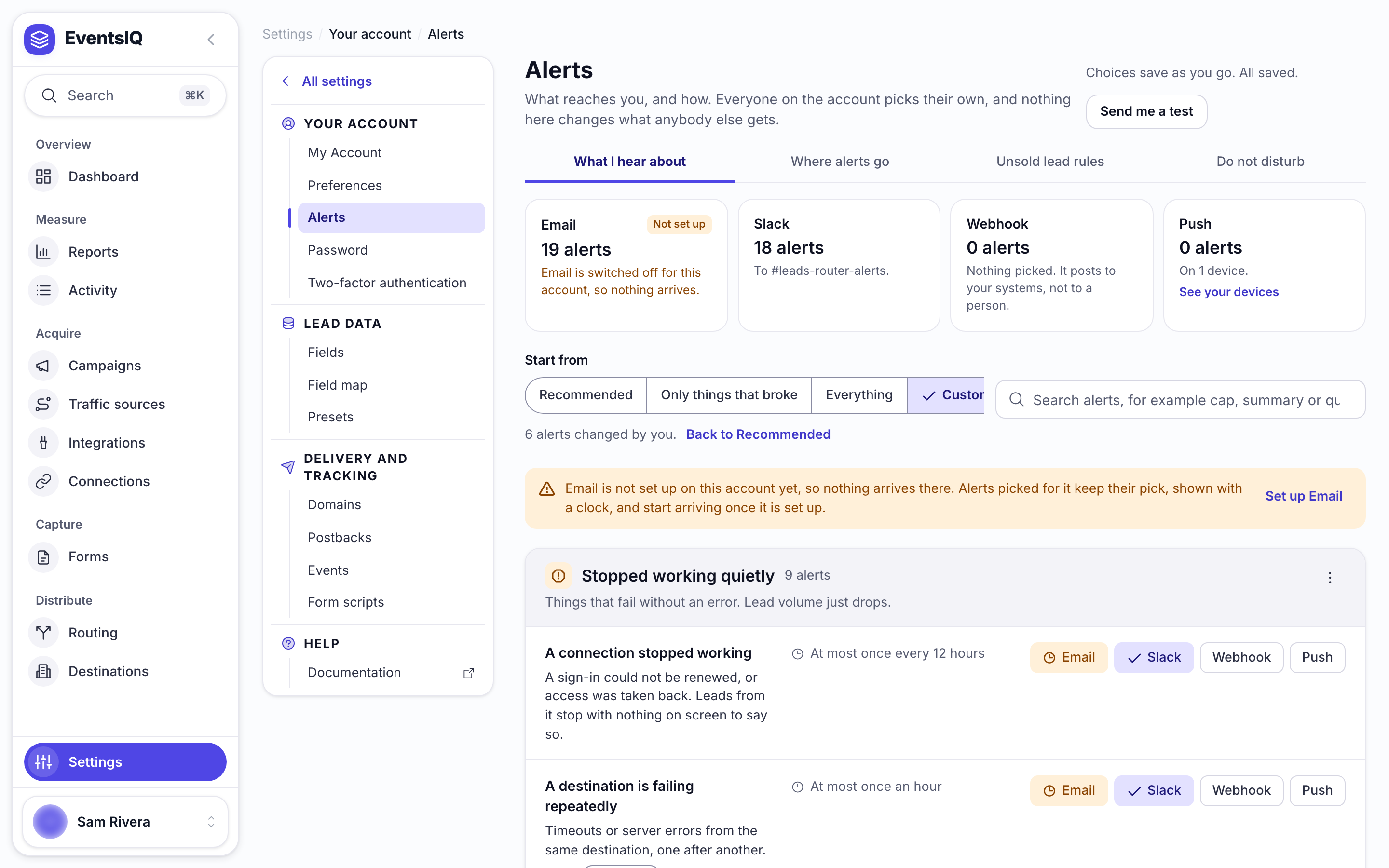
The four cards at the top count the alerts you have on each channel, and say when a channel is not set up for the account yet. Under them, Start from picks a whole set at once: Recommended, Only things that broke or Everything. Change any alert after that and the set becomes Custom; Back to Recommended undoes it.
Each alert is a row with a chip per channel. Click a chip to switch that channel on or off for that alert. An alert picked for a channel the account has not set up keeps its pick, shown with a clock, and starts arriving once the channel is set up. Send me a test, for owners and admins, sends a test to your own email, and to your browsers when you have push devices.
Two people on the same account can want completely different alerts, and nothing on this tab changes what anybody else gets.
Where alerts go
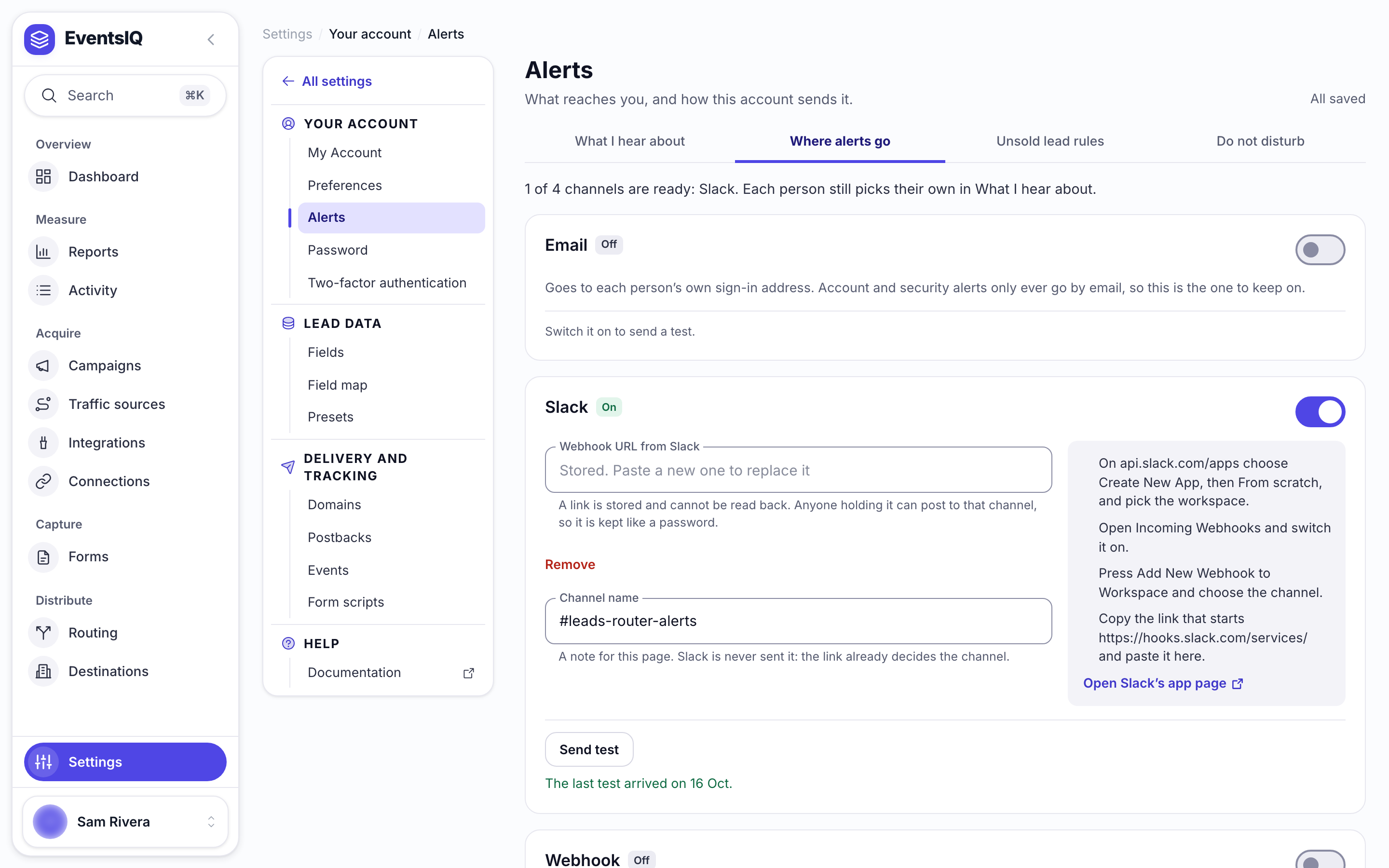
One card per channel, each with its own switch: Email, Slack (the Webhook URL from Slack and a Channel name for your own reference), Webhook (an Address, a Signing secret and an optional Custom body) and Push. A Slack link or webhook secret is stored and cannot be read back, because anyone holding it can post to that channel.
Unsold lead rules
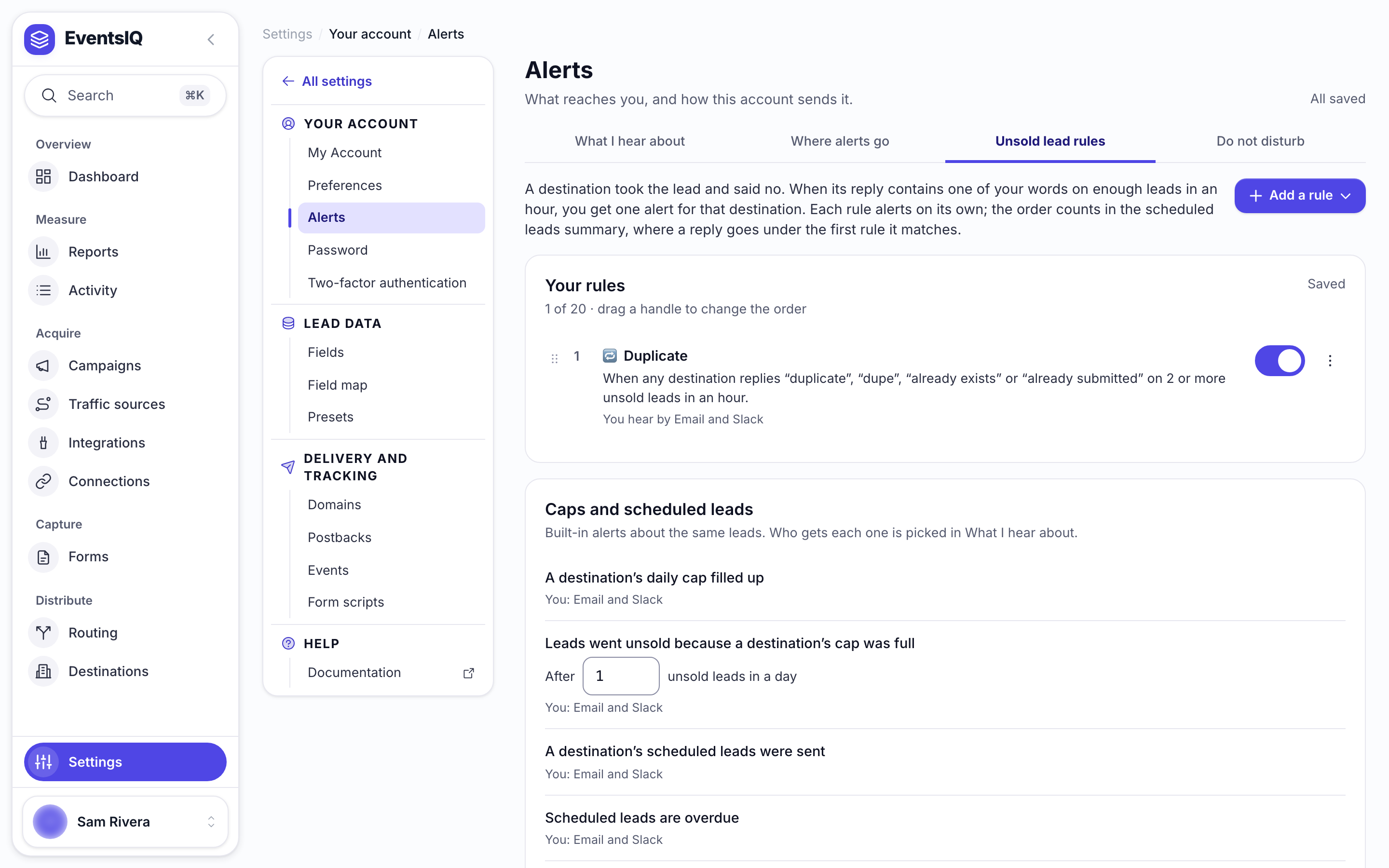
Your rules are the reply alerts described under Unsold leads. Caps and scheduled leads below them lists the built-in alerts about the same leads, and holds the number of unsold leads a full cap needs before it alerts.
Do not disturb
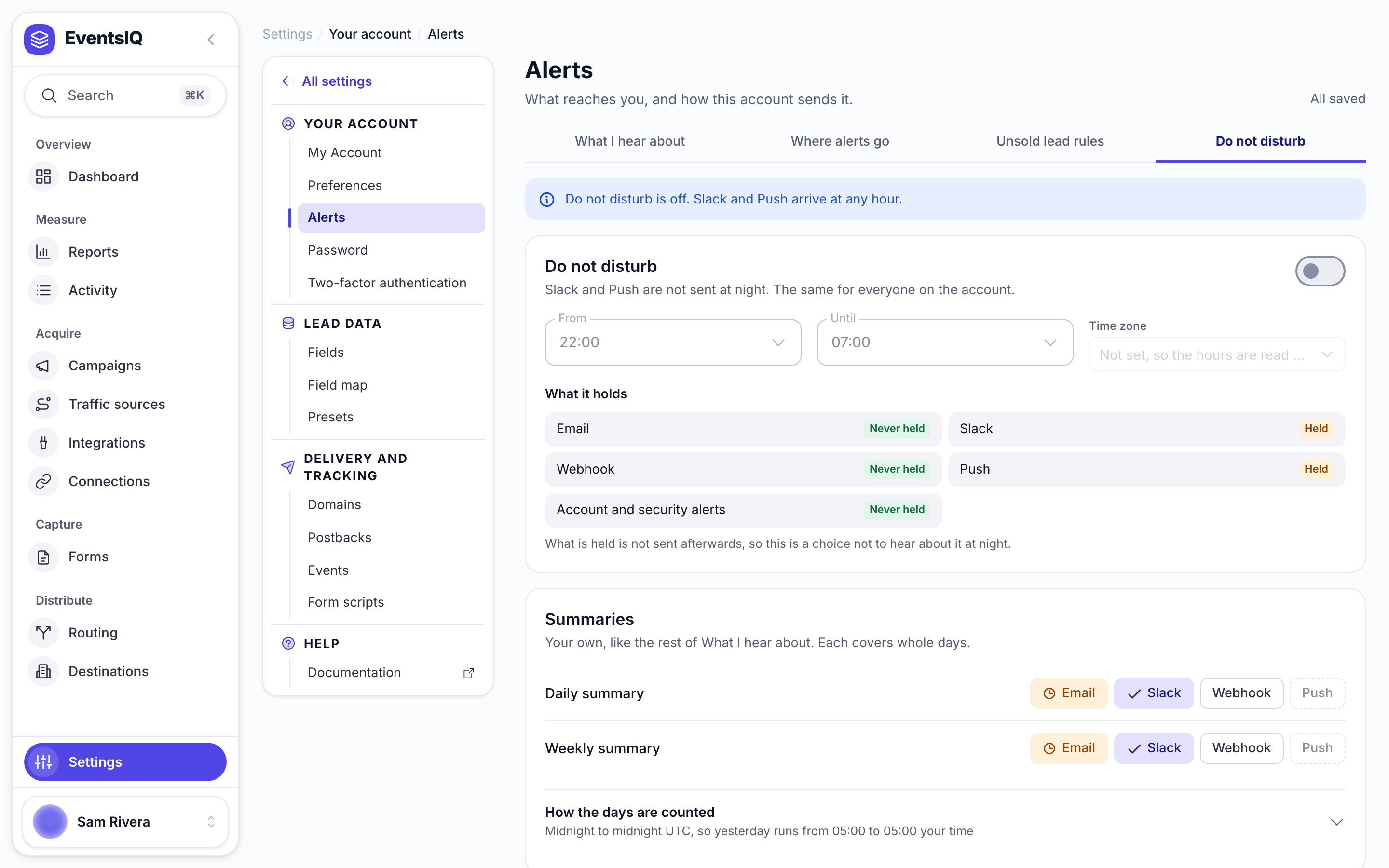
The night hours for the account, with what each channel does in them. See Quiet hours. Summaries on the same tab are your own choices, like the rest of What I hear about.
Links in messages
Links in messages, at the bottom of Where alerts go, chooses where the button in Slack, email and push takes people, and the name the messages use: This app's own address (the button reads Open in App) or formwork1.vercel.app (Open in LeadRouter, and emails signed LeadRouter). It is a list, not a box to type in, so the address cannot be mistyped.
Send a test before you trust it
Every channel on Where alerts go has a Send test button once it is switched on, and it is worth using every time you change something. A Slack URL with a character missing fails in exactly the same way as a Slack URL that is correct but whose channel was archived: silently, at the moment you needed it.
The test sends from the saved configuration, so save first. Testing an unsaved change would report the old value's result and send you looking for a bug you had already fixed.
Sending to your own system
The webhook channel posts JSON to an endpoint you own. By default the body is a fixed shape:
1{
2    "event": "destination.failing",
3    "category": "silent_failure",
4    "subjectId": "6a7b2c1d9e0f4a3b5c6d7e8f",
5    "title": "Northline Solar is failing",
6    "body": "The last 5 calls to Northline Solar failed.",
7    "url": "https://app.example.com/logs?buyerId=...",
8    "data": { "failures": 5, "lastStatus": 502 },
9    "sentAt": "2026-09-07T14:31:09.482Z"
10}
event and subjectId together are what let your receiver deduplicate on its own side. data is
the structured half the human channels cannot carry: a price, a failure count, an HTTP status.
If the far end is a system you do not control and it already expects a particular shape, open Custom body on the webhook card and write your own using those eight values as tokens:
1{
2  "text": "{{title}}",
3  "detail": "{{body}}",
4  "meta": {{{data}}}
5}
Inside quotes, {{data}} arrives as an escaped JSON string. With no quotes, {{{data}}} arrives as
a real object. The preview beside the editor shows which you have written, filled in with example
values, and warns you if the result is not valid JSON. It is sent exactly as written: EventsIQ will
not quietly repair it, because then the preview would not be the truth.
Setting a signing secret adds an X-EventsIQ-Signature header: an HMAC-SHA256 of the body,
using your secret as the key, sent as sha256=<hex>. Recompute it on your side and compare. The
secret itself is never transmitted, so a signature is only valid for the one body it signs and is
useless for forging another. This is the same scheme EventsIQ's inbound webhooks use, deliberately:
one verifier works in both directions.
Each request also carries the same value as X-Formwork-Signature, the header's name before the
rename, so a receiver you already built keeps working. That copy will be removed after
13 January 2027, so change your receiver to read X-EventsIQ-Signature before then.
What EventsIQ will tell you about
Things that stopped working quietly
These are the ones worth having, and they are on by default.
- A connected account stopped working, because a token could not be refreshed or a grant was revoked
- A destination is failing repeatedly
- Every destination declined, repeatedly, so the waterfall is running and selling nothing
- A source has gone quiet
- Leads are arriving into a paused routing
- A preset has stopped matching, so everything is falling through to the default waterfall
- A source is capturing leads but routing nowhere
- Scheduled leads are overdue: 45 minutes past their send time, with none sent in the last 30 minutes, which usually means the 15-minute send has stopped. Checked hourly
- The scheduled leads send failed on an error. The leads stay scheduled and are tried again
Unsold leads
Leads nobody bought, or that wait for a destination's next day. All four are on by default, by email and Slack.
- A destination's daily cap filled up. Sent the moment a destination's daily cap is full, once per destination per day. When the destination schedules its extra leads for the next day, the message says when they will be sent. A destination that says its cap is full in a reply sends its own version: "Northline Solar says its daily cap is full", with the reply. A cap for one platform only says which platform.
- Scheduled leads are being sent. Every 15 minutes while a destination's batch is still going out: how many are sent, sold, declined and still to go. A batch sent in one run skips this and gets only the done message. On by default for Slack only.
- A destination's scheduled leads were sent. After the next-day send has nothing left to send for that destination: how many sold, how many came back with a reply one of your reply alerts names (for example 9 Duplicate), how many were declined for another reason, and how many did not go. With no reply alert for that destination, Duplicate replies are counted anyway.
- A destination's cap was full. Leads were skipped because a destination's daily cap was full, and no other destination bought them. Scheduled leads are not counted, because they are sent the next day. One message per destination per day. Set how many unsold leads it takes on the Unsold lead rules tab, under Caps and scheduled leads (default 1).
- A destination's reply matched one of your reply alerts. You make the rules on the Unsold lead rules tab. Each rule has a name, the words to look for in the destination's reply (any one of them is a match, capital letters do not matter), one destination or all of them, and how many leads in an hour it takes (default 5). By default only leads nobody else bought are counted. One message per rule and destination per hour.
A Duplicate rule is one click: Add a rule → Duplicate fills in duplicate, dupe, already exists and already submitted. No match and Invalid phone are ready-made too, and Blank rule takes your own words for any other reply. Drag a rule's handle to change the order: in the scheduled leads summary, a reply is counted under the first rule it matches.
The daily summary also lists how many leads went unsold for each of these reasons.
Limits and billing
Near a limit, at a limit, blocked by a limit, or a failed payment.
Individual leads
A lead arrived, a lead sold, a lead was rejected for a missing field, a postback gave up.
All off by default. At any real volume these are noise, and an alert you have learned to ignore is
worse than no alert, because you will ignore the important one sitting next to it. If you do turn
A lead sold on, set a floor price so only the ones worth knowing about interrupt you.
Account and security
New device, password changed, team member added or removed, API key created.
These cannot be switched off, and they only ever go by email. Someone who can silence "a team member was added" can add a team member unobserved, which makes the alert worth less than nothing.
Summaries
A daily or weekly rollup: leads in, sold, revenue, top destination, errors, and leads lost to a full cap or to one of your reply alerts.
An account with no activity in the period gets no summary. A message telling you nothing happened is the fastest way to teach yourself to stop opening them.
Telling alerts apart
In Slack and email each message has a coloured bar down its left side: green for good news such as a sale, red for something broken, yellow for something worth a look, and indigo for plain news. The numbers that matter, such as sold and Duplicate counts, sit in a small grid under the message.
Each kind of alert starts with its own emoji in Slack, email and push, so you can see what it is before reading it: 🧢 a full cap, ⏳ scheduled leads on their way, 📅 scheduled leads sent, 🔁 a reply alert, 😴 a quiet source, 🚫 every destination declined, 🚨 a failing destination or a failed scheduled send, ⏰ overdue scheduled leads, 🔌 a broken connection, ⏸️ a paused routing, 🧩 a preset that stopped matching, 🧭 a source routing nowhere, ⚠️ and ⛔ limits, 💳 a failed payment, 💰 a sale, 📥 a new lead, 📊 a summary and 🔐 security. A test message starts with 🧪.
Each reply rule has its own Emoji in the message box, 🔁 unless you pick another, so a Duplicate rule and a No Match rule look different in the channel. The webhook sends the title without the emoji, because a system reads it, not a person.
When alerts arrive
Most alerts arrive the moment the thing happens, for example a lead selling. The silent-failure alerts are different, because each one is about something that stopped happening, like a source going quiet. EventsIQ checks for those once an hour, so they can arrive up to an hour late.
The summaries go out on their own schedule: the daily at 13
UTC, the weekly at 13 UTC on Monday.So if you break something on purpose to test an alert, give it up to an hour. If you fix it within the hour, the alert may never arrive, because by the next check there is nothing wrong.
Why you get one message and not five hundred
Every event has a cooldown: how long the same alert about the same thing stays quiet after it fires. A destination timing out on every lead for an hour produces one Slack message, not four hundred.
This is the setting that decides whether alerting is useful. Without it a single bad afternoon fills the channel, somebody mutes it, and every alert in this list stops working, including the ones that would have paid for themselves.
Cooldowns differ by event, because the useful repeat interval does. A revoked grant repeats every twelve hours, since the answer does not change until somebody reconnects. A lead selling has no cooldown at all, because each one is a different lead.
Quiet hours
Do not disturb holds back Slack and push overnight, between its From and Until times. Email, the webhook and account and security alerts are never held.
A Slack or push notification that fires inside your quiet window is dropped, not delayed. There is no queue that delivers it in the morning.
It is recorded, so you can see in the log that it happened and was suppressed. But nothing re-sends it. For alerts with a short cooldown this barely matters, since the problem is still there an hour later and the alert fires again. For the twelve-hour ones, a problem that starts at 22
may not reach Slack until the morning.If overnight coverage matters to you, leave email on for the silent-failure events. Email ignores quiet hours entirely.
Thresholds
Some events need a number, and the right number depends on your volume. Each one sits on its alert's row in What I hear about, for example "After 5 failures in a row". They are the account's, so only an owner or admin can change them:
- Percentage of a limit at which the warning fires
- Consecutive failures before a destination is called failing
- Consecutive leads with nothing accepted before the waterfall is called dead
- Hours of silence before a source is called quiet
- Minimum sale price worth notifying about
If an alert never arrives
Work down this list:
- Is the event switched on for you, on that channel, under Settings → Alerts? Preferences are per person, so a colleague receiving it does not mean you will.
- Is the channel configured and passing its test on Where alerts go?
- Did it fire inside Do not disturb hours on Slack or push?
- Is it inside its cooldown from a previous firing?
- Is it a silent-failure alert that the hourly check has not reached yet?
- For push: is this device still enrolled? Subscriptions expire, and EventsIQ removes them when the browser reports them as gone.
- For push, if the test says it worked: your operating system is almost certainly discarding it. See the note under the four channels above.